Lab 2: Changing Tempo
Learning Goals
In this lab, we will be exploring how chemical composition gradients ( , where is the mean-molecular weight) impact the g-mode period spacing. For a nice overview, see Miglio et al., 2008. Our goals for this lab are:
- Run
MESAstarting from a precomputed.modfile - Use
run_star_extras.f90to control when profiles are saved - Run
GYREat specific evolutionary stages using pulsation-profiles
Background Science
As a review, the oscillation period ( ) for a g-mode of radial order and spherical degree is given by
where is a small constant and is given by:
where is the Brunt-Väisälä frequency and the integral is taken over the propagation cavity of the g-mode. The period spacing, , is the difference in period between modes of consecutive order with the same spherical degree:
In the asymptotic limit (large
) for a chemically homogenous medium (i.e.,
), this spacing is approximately constant. That is what we observed when we plotted
vs.
for our zero-age main-sequence (ZAMS) model in Lab 1. At the ZAMS–the start of hydrogen ignition–MESA begins with a chemically homogenous mixture.
As the star evolves beyond the ZAMS, nuclear burning alters the chemical composition of the core and introduces a composition gradient. The gradient causes peaks in the Brunt-Väisälä frequency, which–in an ideal gas–is described by:
where
The three plots below show the Brunt-Väisälä frequency as a function of stellar radius for three different evolutionary stages: zero-age main sequence, intermediate-age main sequence, and terminal-age main sequence. Notice in particular the blue curves, which show the contribution to the Brunt-Väisälä profiles due to the chemical composition gradient, while the green curve shows thermal contributions, and the red curve shows the total Brunt-Väisälä profile.
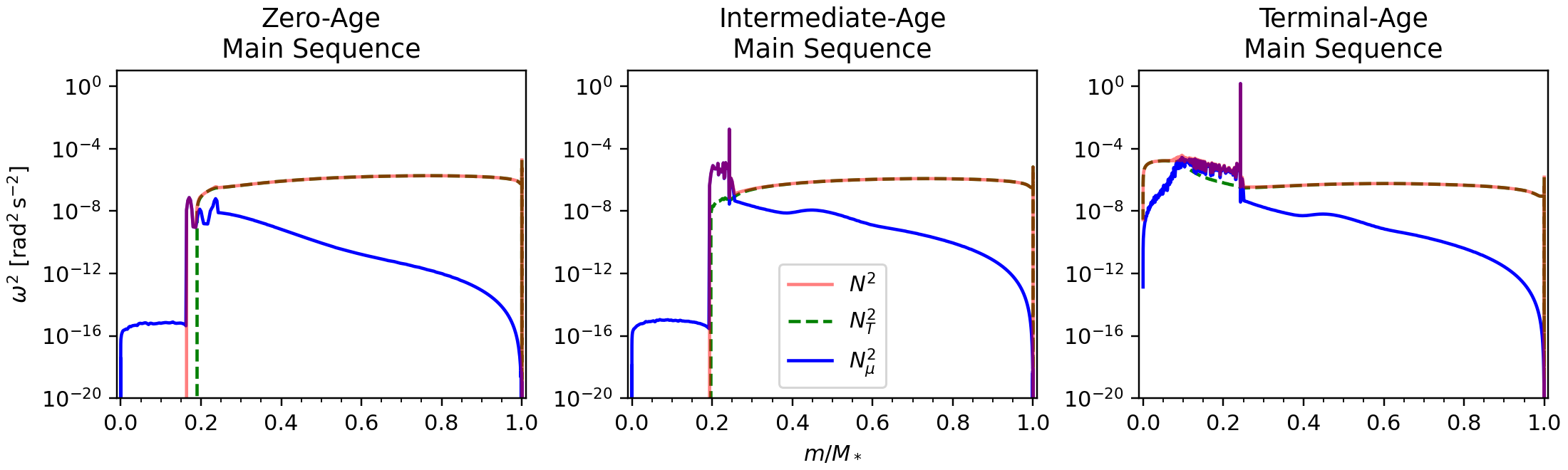
At the ZAMS (left panel), the chemical composition gradient is near zero, creating a smooth Brunt-Väisälä profile. As a result, the asymptotic approximation works well and the period spacing remains nearly constant.
In the intermediate-age main sequence model (middle panel), due to hydrogen burning in the core. This produces a narrow spike in (see the new “bump” starting at a mass fraction of 0.2 and continuing until roughly 0.3). The spike partially reflects and traps some g-modes while others penetrate more deeply into the core. Because different modes now probe different regions, their periods are shifted by different amounts. This produces the characteristic “dips” or oscillatory deviations from a constant period spacing.
By the terminal-age main sequence (right panel), the composition gradient has broadened and become more complex as the star exhausts its core hydrogen supply. The feature is no longer a thin, localized spike but an extended region. Instead of clean, coherent trapping signatures, the broader gradient affects a wider range of modes; the resulting perturbations to the mode periods become less regular so the dips in the period spacing pattern appear less coherent.
In this lab, we will evolve a stellar model through the main sequence and examine how the resulting compositon gradients produce these dips in the period spacing pattern.
Task 1: A Fresh Start
Start by copying a clean working directory from $MESA_DIR/star/work and placing somewhere else. Give the new directory a descriptive name–something like day2_lab2.
Warning
It is generally not a great idea to work directly inside the clean $MESA_DIR/star/work work directory; instead, you should copy it and place it somewhere else before making any changes.
Hint: Copying a work directory
In the location you are working in, run:
cp -r $MESA_DIR/star/work ./day2_lab2Then:
cd day2_lab2Task 2: Getting the (&star_) Job Done
For now, we are only going to edit inlist_project; open the file and briefly look through the default inlist structure.
We will configure the inlist one namelist at a time. Starting at the top, we are going to alter the &star_job namelist first. For this section, the star_job reference page will be a helpful resource.
Rather than create a pre-main sequence model every time we run our inlist, we are going to start from a pre-computed zero-age main sequence model named zams.mod, which you can download here or you can copy it from your Lab 1 directory. This model is for a
star with solar metallicty at the zero-age main sequence.
We also won’t need to save a model at the end of our run. Remove the lines related to creating a pre-main sequence model and saving a model at termination.
In their place, we need to load our zams.mod file and tell MESA to start our new run there. Use the &star_job reference page to determine how to load a saved model. If you get stuck you can expand the hint below.
Hint: Loading a saved model
To load a saved model, we need to tell MESA to load a model, and tell it the name of the model we want to load. We do with these to lines:
load_saved_model = .true.
load_model_filename = 'zams.mod'
At this point, your &star_job namelist should look something like this:
&star_job

   ! see star/defaults/star_job.defaults

   ! start run with zams.mod
   load_saved_model = .true.
   load_model_filename = 'zams.mod'

   ! display on-screen plots
   pgstar_flag = .true.

/ ! end of star_job namelist
We don’t need to make any changes to the &eos and &kap namelists. They are sufficient for what we are trying to do here.
Note
For science cases, you may want to consider changing parameters in the &eos and &kap namelists. It isn’t guaranteed that the defaults will always be right for your particular case.
Task 3: Taking &control[s]
Next, we will edit the &controls namelist. For this section, the controls reference page will be helpful.
The basic inlist_project file helpfully breaks the &controls namelist into smaller chunks that can tell you about what the namelist can do.
In the “starting specifications” section, set initial_mass = 5d0 to match the mass of our zams.mod model. We can leave the metallicity as it is.
Note
It is not strictly necessary to set the mass in our inlist, since zams.mod should know. However, it is helpful to keep track of the mass this way. If the values in the inlist differ from the model values, MESA will overwrite with the model values.
We can tell our model when to terminate in the “when to stop” section. The current stopping condition is set to terminate at the zero-age main sequence. Because the run now begins at the ZAMS, the default stopping conditions are no longer appropriate. Delete everything between ! when to stop and ! wind.
In it’s place, we will add our own stopping condition. Since we want to evolve through the entire main sequence, we need a stopping condition at the terminal-age main sequence (TAMS). This will also allow us to compare the period spacing pattern near the end of core hydrogen burning.
Explore the “when to stop” section of the controls reference page and find a stopping condition that terminates at the TAMS. If you get stuck, feel free to expand the following hint.
Hint: Stopping at the TAMS
It is likely that in your exploration you came across this stopping condition:
stop_at_phase_TAMS = .true.This condition stops the model at the correct evolutionary stage, but it is important to understand how MESA defines each evolutionary phase before using phase-based stopping conditions.
If you look for the subroutine set_phase_of_evolution in $MESA_DIR/star/private/star_utils.f90 and search for the definition of phase_TAMS, you will see that it is defined by the core hydrogen abundance:
         else if (center_h1 <= 1d-6) then
            s% phase_of_evolution = phase_TAMS
In other words, phase_TAMS is triggered when central hydrogen abundance falls below
. That means that stop_at_phase_TAMS = .true. is probably okay to use as a stopping condition in our case; however, an entirely equivalent stopping condition could have been:
xa_central_lower_limit_species(1) = 'h1'
xa_central_lower_limit(1) = 1d-6
Feel free to check your &controls namelist in the collapsible box below.
&controls Namelist
&controls

   ! see star/defaults/controls.defaults

   ! starting specifications
   initial_mass = 5d0 ! in Msun units
   initial_z = 0.02

   ! when to stop
   ! stop at the terminal age main sequence (TAMS)
   ! defined by center_h1 <= 1d-6 (core hydrogen depletion)
   ! see line 2957 of $MESA_DIR/star/private/star_utils.f90
   stop_at_phase_TAMS = .true.

   ! wind

   ! atmosphere

   ! rotation

   ! element diffusion

   ! mlt

   ! mixing

   ! timesteps

   ! mesh

   ! solver
   ! options for energy conservation (see MESA V, Section 3)
   energy_eqn_option = 'dedt'
   use_gold_tolerances = .true.

   ! output

/ ! end of controls namelist
Task 4: Mesh Happens
The next section we will need to change is the “mesh” section. This section controls the spatial resolution of the stellar model.
MESA divides a stellar model into concentric shells with radial thickness
. To make sure that important physics are captured, MESA also has an adaptive mesh refinement (AMR) algorithm that can change
as needed. In some cases, however, the default AMR settings may not provide enough resolution for the physics of interest.
Note
MESA actually does its mesh in terms of mass fraction rather than radial shells. However, since mass fraction and radial coordinate can be related to one-another, our analogy is sufficient to build a mental model. Note that the documentation may also refer to these shells as “zones” or “cells.”
Asteroseismology is particularly sensitive to spatial resolution, so we will want to increase the default resolution.
To increase the resolution of our model, we are going to use the variable mesh_delta_coeff, which is a multiplicative factor on
. By default, MESA sets mesh_delta_coeff = 1. Smaller values of mesh_delta_coeff increases the spatial resolution by creating more, thinner shells.
Increasing the resolution of a model can be a bit more computationally expensive depending on your machine. Lower values of mesh_delta_coeff will increase the runtime. It is then up to you to make an informed decision based on the specifications of your specific machine. The primary factor that will effect the runtime is the OMP_NUM_THREADS parameter you have set in your environment variables.
If you have OMP_NUM_THREADS > 2, set mesh_delta_coeff = 0.5 in your inlist. If you have 2 or less, set it instead to 0.6.
Task 5: Output, Output, Read All About It!
Next, we will configure the output settings so MESA writes files that can be used by GYRE. By default, MESA does not write pulsation-profile data. Explore the “controls for output” section of the controls reference page and identify the flag that enables pulsation-profile output for GYRE. You will also need to tell MESA to write the files in FGONG format.
Check the following hint if you get stuck or want to check your answer.
Hint: Saving pulsation profiles for GYRE
The flag we are interested in is write_pulse_data_with_profile, which tells MESA to save pulsation-profile data for use in GYRE; set it to .true..
We also need to specify the format of the pulsation data. We are going to use the .FGONG format, which is compatible with GYRE. Altogether, your output section should look something like:
   ! output

   ! setting profile format for GYRE
   write_pulse_data_with_profile = .true.
   pulse_data_format = 'FGONG'
With the correct flag, MESA will write a unique .data.FGONG file for every profile it creates. Since we are only interested in specific stages, we will need to tell MESA when to write profiles. This will require some extra code in our ./src/run_star_extras.f90, which we will get to later.
In the meantime, turn profile generation off by including the following line in the &controls section of your inlist:
profile_interval = -1Since a negative interval isn’t possible, MESA interprets this as disabling automatic profile output.
Bonus Task: No History, No Problems
This step is optional, but it can help keep the working directory clean during repeated runs.
Since we are interested in only specific points in time for this lab and not the evolution of the star over it’s whole lifetime, we don’t need a full history.data file. Since we also do not plan to restart uninterrupted runs, photo files are unnecessary. Turn history file and photo generation off with the following lines:
photo_interval = -1
do_history_file = .false.
Important
You should only do this if you are certain that you don’t need such data. Otherwise, you may be keeping yourself from the data you need.
Task 6: Engine Ignition
The inlist should now be complete enough to test. Compile and run the model with:
./clean
./mk
./rn
If the model begins evolving and output appears in the terminal, the inlist is working correctly. Once the run starts successfully, stop it with Ctrl+C.
If you have gotten an error, work with your TA to find the cause or expand the following hint for a complete inlist.
Hint: Complete ZAMS to TAMS Inlist
At this point, your full inlist should look something like this (make sure you have an empty line at the end; without it, MESA will not run!):
! inlist to evolve a 15 solar mass star

! For the sake of future readers of this file (yourself included),
! ONLY include the controls you are actually using.  DO NOT include
! all of the other controls that simply have their default values.

&star_job

   ! see star/defaults/star_job.defaults

   ! start run with zams.mod
   load_saved_model = .true.
   load_model_filename = 'zams.mod'

   ! display on-screen plots
   pgstar_flag = .true.

/ ! end of star_job namelist


&eos

   ! eos options
   ! see eos/defaults/eos.defaults

/ ! end of eos namelist


&kap
   ! kap options
   ! see kap/defaults/kap.defaults
   use_Type2_opacities = .true.
   Zbase = 0.02

/ ! end of kap namelist


&controls

   ! see star/defaults/controls.defaults

   ! starting specifications
   initial_mass = 5d0 ! in Msun units
   initial_z = 0.02

   ! when to stop
   ! stop at the terminal age main sequence (TAMS)
   ! defined by center_h1 <= 1d-6 (core hydrogen depletion)
   ! see line 2957 of $MESA_DIR/star/private/star_utils.f90
   stop_at_phase_TAMS = .true.

   ! wind

   ! atmosphere

   ! rotation

   ! element diffusion

   ! mlt

   ! mixing

   ! timesteps

   ! mesh
   ! increase mesh "resolution"
   mesh_delta_coeff = 0.8

   ! solver
   ! options for energy conservation (see MESA V, Section 3)
   energy_eqn_option = 'dedt'
   use_gold_tolerances = .true.

   ! output

   ! setting profile format for GYRE
   write_pulse_data_with_profile = .true.
   pulse_data_format = 'FGONG'

   ! don't save profiles unless told otherwise
   ! NECESSARY; otherwise we can't guarantee
   ! profiles will save at the expected times
   profile_interval = -1

   ! don't save photos or a history file to save space
   ! not strictly necessary
   photo_interval = -1
   do_history_file = .false.

/ ! end of controls namelist
Note
As you work through the lab, make sure that you remove old data before you re-run: rm -rf LOGS.
Task 7: Extra! Extra! Read run_star_extras.f90!
Next, we will modify run_star_extras.f90 so that MESA saves profiles at specific evolutionary stages.
Note
In this section, it is good practice to recompile any time you make any change to run_star_extras.f90. Even when you aren’t explicitly told, feel free to run ./clean; ./mk as often as you want!
Although MESA could save a profile at every timestep, searching through all of those outputs would quickly become inconvenient. Instead, we will keep automatic profile generation off and only request profiles when we want them.
Remember that our goal is to see how chemical composition gradients effect the g-mode period spacing. As the model evolves through the main sequence, nuclear fusion gradually builds composition gradients in the stellar interior. We will save profiles at a few set values of the central hydrogen abundance to track this evolution.
To do this, we are going to have to delve into run_star_extras.f90. In your working directory, open ./src/run_star_extras.f90 and inspect the default template. You should see something like this:
! ***********************************************************************
!
!   Copyright (C) 2010-2025  Bill Paxton & The MESA Team
!
!   This program is free software: you can redistribute it and/or modify
!   it under the terms of the GNU Lesser General Public License
!   as published by the Free Software Foundation,
!   either version 3 of the License, or (at your option) any later version.
!
!   This program is distributed in the hope that it will be useful,
!   but WITHOUT ANY WARRANTY; without even the implied warranty of
!   MERCHANTABILITY or FITNESS FOR A PARTICULAR PURPOSE.
!   See the GNU Lesser General Public License for more details.
!
!   You should have received a copy of the GNU Lesser General Public License
!   along with this program. If not, see <https://www.gnu.org/licenses/>.
!
! ***********************************************************************

module run_star_extras

   use star_lib
   use star_def
   use const_def
   use math_lib

   implicit none

   ! these routines are called by the standard run_star check_model
contains

   include 'standard_run_star_extras.inc'

end module run_star_extras
This file provides tools for users to add custom behavior to a MESA run.
First, We first need to find standard_run_star_extras.inc and copy all of its contents to our file. To find it, run the following command in your terminal:
find $MESA_DIR/*/standard_run_star_extras.incIt should output something like:
$MESA_DIR/include/standard_run_star_extras.incReplace the line If you got stuck on the previous step, copy these contents into your include standard_run_star_extras.inc in your run_star_extras.f90 file with the contents of standard_run_star_extras.inc. Expand the following hint if you want to confirm that your file looks as it should.Hint:
run_star_extras.f90 Template./src/runs_star_extras.f90 file:! ***********************************************************************
!
! Copyright (C) 2010-2025 Bill Paxton & The MESA Team
!
! This program is free software: you can redistribute it and/or modify
! it under the terms of the GNU Lesser General Public License
! as published by the Free Software Foundation,
! either version 3 of the License, or (at your option) any later version.
!
! This program is distributed in the hope that it will be useful,
! but WITHOUT ANY WARRANTY; without even the implied warranty of
! MERCHANTABILITY or FITNESS FOR A PARTICULAR PURPOSE.
! See the GNU Lesser General Public License for more details.
!
! You should have received a copy of the GNU Lesser General Public License
! along with this program. If not, see <https://www.gnu.org/licenses/>.
!
! ***********************************************************************
module run_star_extras
use star_lib
use star_def
use const_def
use math_lib
implicit none
! these routines are called by the standard run_star check_model
contains
subroutine extras_controls(id, ierr)
integer, intent(in) :: id
integer, intent(out) :: ierr
type (star_info), pointer :: s
ierr = 0
call star_ptr(id, s, ierr)
if (ierr /= 0) return
! this is the place to set any procedure pointers you want to change
! e.g., other_wind, other_mixing, other_energy (see star_data.inc)
! the extras functions in this file will not be called
! unless you set their function pointers as done below.
! otherwise we use a null_ version which does nothing (except warn).
s% extras_startup => extras_startup
s% extras_start_step => extras_start_step
s% extras_check_model => extras_check_model
s% extras_finish_step => extras_finish_step
s% extras_after_evolve => extras_after_evolve
s% how_many_extra_history_columns => how_many_extra_history_columns
s% data_for_extra_history_columns => data_for_extra_history_columns
s% how_many_extra_profile_columns => how_many_extra_profile_columns
s% data_for_extra_profile_columns => data_for_extra_profile_columns
s% how_many_extra_history_header_items => how_many_extra_history_header_items
s% data_for_extra_history_header_items => data_for_extra_history_header_items
s% how_many_extra_profile_header_items => how_many_extra_profile_header_items
s% data_for_extra_profile_header_items => data_for_extra_profile_header_items
end subroutine extras_controls
subroutine extras_startup(id, restart, ierr)
integer, intent(in) :: id
logical, intent(in) :: restart
integer, intent(out) :: ierr
type (star_info), pointer :: s
ierr = 0
call star_ptr(id, s, ierr)
if (ierr /= 0) return
end subroutine extras_startup
integer function extras_start_step(id)
integer, intent(in) :: id
integer :: ierr
type (star_info), pointer :: s
ierr = 0
call star_ptr(id, s, ierr)
if (ierr /= 0) return
extras_start_step = 0
end function extras_start_step
! returns either keep_going, retry, or terminate.
integer function extras_check_model(id)
integer, intent(in) :: id
integer :: ierr
type (star_info), pointer :: s
ierr = 0
call star_ptr(id, s, ierr)
if (ierr /= 0) return
extras_check_model = keep_going
if (.false. .and. s% star_mass_h1 < 0.35d0) then
! stop when star hydrogen mass drops to specified level
extras_check_model = terminate
write(*, *) 'have reached desired hydrogen mass'
return
end if
! if you want to check multiple conditions, it can be useful
! to set a different termination code depending on which
! condition was triggered. MESA provides 9 customizable
! termination codes, named t_xtra1 .. t_xtra9. You can
! customize the messages that will be printed upon exit by
! setting the corresponding termination_code_str value.
! termination_code_str(t_xtra1) = 'my termination condition'
! by default, indicate where (in the code) MESA terminated
if (extras_check_model == terminate) s% termination_code = t_extras_check_model
end function extras_check_model
integer function how_many_extra_history_columns(id)
integer, intent(in) :: id
integer :: ierr
type (star_info), pointer :: s
ierr = 0
call star_ptr(id, s, ierr)
if (ierr /= 0) return
how_many_extra_history_columns = 0
end function how_many_extra_history_columns
subroutine data_for_extra_history_columns(id, n, names, vals, ierr)
integer, intent(in) :: id, n
character (len=maxlen_history_column_name) :: names(n)
real(dp) :: vals(n)
integer, intent(out) :: ierr
type (star_info), pointer :: s
ierr = 0
call star_ptr(id, s, ierr)
if (ierr /= 0) return
! note: do NOT add the extras names to history_columns.list
! the history_columns.list is only for the built-in history column options.
! it must not include the new column names you are adding here.
end subroutine data_for_extra_history_columns
integer function how_many_extra_profile_columns(id)
integer, intent(in) :: id
integer :: ierr
type (star_info), pointer :: s
ierr = 0
call star_ptr(id, s, ierr)
if (ierr /= 0) return
how_many_extra_profile_columns = 0
end function how_many_extra_profile_columns
subroutine data_for_extra_profile_columns(id, n, nz, names, vals, ierr)
integer, intent(in) :: id, n, nz
character (len=maxlen_profile_column_name) :: names(n)
real(dp) :: vals(nz,n)
integer, intent(out) :: ierr
type (star_info), pointer :: s
integer :: k
ierr = 0
call star_ptr(id, s, ierr)
if (ierr /= 0) return
! note: do NOT add the extra names to profile_columns.list
! the profile_columns.list is only for the built-in profile column options.
! it must not include the new column names you are adding here.
! here is an example for adding a profile column
!if (n /= 1) stop 'data_for_extra_profile_columns'
!names(1) = 'beta'
!do k = 1, nz
! vals(k,1) = s% Pgas(k)/s% P(k)
!end do
end subroutine data_for_extra_profile_columns
integer function how_many_extra_history_header_items(id)
integer, intent(in) :: id
integer :: ierr
type (star_info), pointer :: s
ierr = 0
call star_ptr(id, s, ierr)
if (ierr /= 0) return
how_many_extra_history_header_items = 0
end function how_many_extra_history_header_items
subroutine data_for_extra_history_header_items(id, n, names, vals, ierr)
integer, intent(in) :: id, n
character (len=maxlen_history_column_name) :: names(n)
real(dp) :: vals(n)
type(star_info), pointer :: s
integer, intent(out) :: ierr
ierr = 0
call star_ptr(id,s,ierr)
if(ierr/=0) return
! here is an example for adding an extra history header item
! also set how_many_extra_history_header_items
! names(1) = 'mixing_length_alpha'
! vals(1) = s% mixing_length_alpha
end subroutine data_for_extra_history_header_items
integer function how_many_extra_profile_header_items(id)
integer, intent(in) :: id
integer :: ierr
type (star_info), pointer :: s
ierr = 0
call star_ptr(id, s, ierr)
if (ierr /= 0) return
how_many_extra_profile_header_items = 0
end function how_many_extra_profile_header_items
subroutine data_for_extra_profile_header_items(id, n, names, vals, ierr)
integer, intent(in) :: id, n
character (len=maxlen_profile_column_name) :: names(n)
real(dp) :: vals(n)
type(star_info), pointer :: s
integer, intent(out) :: ierr
ierr = 0
call star_ptr(id,s,ierr)
if(ierr/=0) return
! here is an example for adding an extra profile header item
! also set how_many_extra_profile_header_items
! names(1) = 'mixing_length_alpha'
! vals(1) = s% mixing_length_alpha
end subroutine data_for_extra_profile_header_items
! returns either keep_going or terminate.
! note: cannot request retry; extras_check_model can do that.
integer function extras_finish_step(id)
integer, intent(in) :: id
integer :: ierr
type (star_info), pointer :: s
ierr = 0
call star_ptr(id, s, ierr)
if (ierr /= 0) return
extras_finish_step = keep_going
! to save a profile,
! s% need_to_save_profiles_now = .true.
! to update the star log,
! s% need_to_update_history_now = .true.
! see extras_check_model for information about custom termination codes
! by default, indicate where (in the code) MESA terminated
if (extras_finish_step == terminate) s% termination_code = t_extras_finish_step
end function extras_finish_step
subroutine extras_after_evolve(id, ierr)
integer, intent(in) :: id
integer, intent(out) :: ierr
type (star_info), pointer :: s
ierr = 0
call star_ptr(id, s, ierr)
if (ierr /= 0) return
end subroutine extras_after_evolve
end module run_star_extras
./clean; ./mkIf compilation is successful, continue to the next step. If you get an error, take some time to debug with your TA/tablemates before moving forward. Remember that the previous hint has a correct version should you need it.
The expanded template contains several subroutines that MESA calls at different points during the evolution. To see a full flow of control diagram (and some extra information about using run_star_extras.f90), see “Extending MESA” on the docs.
In this lab, we will modify only two subroutines:
- “
extras_start_step”, which runs once at the beginning of a model - “
extras_finish_step”, which runs after each successfully converged timestep.
In extras_start_step, we will begin by storing the initial hydrogen abundance when the run starts. MESA provides the internal array s% xtra(:) for storing temporary data. We will store the initial central hydrogen abundance in s% xtra(1). Replace the entire extras_start_step subroutine with the following code:
      integer function extras_start_step(id)
         integer, intent(in) :: id
         integer :: ierr
         type (star_info), pointer :: s
         ierr = 0
         call star_ptr(id, s, ierr)
         if (ierr /= 0) return
         extras_start_step = 0

         s% xtra(1) = s% center_h1
      end function extras_start_step
Where we have added the line s% xtra(1) = s% center_h1.
Go ahead and recompile to verify that everything is working:
./clean; ./mkNext, we will modify extras_finish_step so that MESA saves a profile whenever the central hydrogen abundance crosses one of our target values. At the end of each timestep, our code will compare the previous central hydrogen abundance to the current value. If the target abundance lies between the two values, MESA will save a profile.
We will store the target abundances in the user-defined control array s% x_ctrl(:), which we will set in the inlist later. x_ctrl(:) is a user-controlled array that allows values from the inlist to be accessed neatly inside run_star_extras.f90.
First, just below the line ! s% need_to_update_history_now = .true. in the extras_finish_step subroutine, add the following code:
          prev_h1 = s% xtra(1)

        if ( prev_h1 > s% x_ctrl(1) .and. s% center_h1 <= s% x_ctrl(1) ) then
             s% need_to_save_profiles_now = .true.
             s% need_to_update_history_now = .true.
             write(*, *) 'First checkpoint -- Central hydrogen abundance:' , s% center_h1
        else if ( prev_h1 > s% x_ctrl(2) .and. s% center_h1 <= s% x_ctrl(2) ) then
            s% need_to_save_profiles_now = .true.
            s% need_to_update_history_now = .true.
            write(*, *) 'Second checkpoint -- Central hydrogen abundance:' , s% center_h1
        end if
This code checks whether the model crossed either of our target hydrogen abundances during the most recent timestep. If it did, the profile-save flag is temporarily enabled. However, if you were to try compiling this right now, you would get an error:
../src/run_star_extras.f90:265:7:

  265 |       prev_h1 = s% xtra(1)
      |       1~~~~~~
Error: Symbol 'prev_h1' at (1) has no IMPLICIT type
make: *** [run_star_extras.o] Error 1

FAILED
This occurs because prev_h1 has not been declared. In Fortran, variables must be explicitly declared before they are used. Since prev_h1 stores a floating-pont value, we will specify that. Add the following line after type (star_info), pointer :: s:
real(dp) :: prev_h1Now, everything should compile without any errors (./clean; ./mk).
Task 8: Hydrogen Checkpoints
Finally, we will define the target hydrogen abundances in the inlist.
Add the following lines near the end of the &controls namelist in inlist_project:
   ! extras
   x_ctrl(1) = 0.6d0
   x_ctrl(2) = 0.3d0
Now, we are ready to run our model! Go ahead and run with ./clean; ./mk; ./rn.
If the model starts successfully, pgstar windows should appear and the evolution should begin. Let the model run in the background while you prepare the GYRE input file.
If you get any errors, work with your table to debug, or expand the following hints for a correct inlist and If you got stuck on the previous step, copy these contents into your If you got stuck on the previous step, copy these contents into your run_star_extras.f90.Hint: Complete
run_star_extras.f90./src/runs_star_extras.f90 file:! ***********************************************************************
!
! Copyright (C) 2010-2025 Bill Paxton & The MESA Team
!
! This program is free software: you can redistribute it and/or modify
! it under the terms of the GNU Lesser General Public License
! as published by the Free Software Foundation,
! either version 3 of the License, or (at your option) any later version.
!
! This program is distributed in the hope that it will be useful,
! but WITHOUT ANY WARRANTY; without even the implied warranty of
! MERCHANTABILITY or FITNESS FOR A PARTICULAR PURPOSE.
! See the GNU Lesser General Public License for more details.
!
! You should have received a copy of the GNU Lesser General Public License
! along with this program. If not, see <https://www.gnu.org/licenses/>.
!
! ***********************************************************************
module run_star_extras
use star_lib
use star_def
use const_def
use math_lib
implicit none
! these routines are called by the standard run_star check_model
contains
subroutine extras_controls(id, ierr)
integer, intent(in) :: id
integer, intent(out) :: ierr
type (star_info), pointer :: s
ierr = 0
call star_ptr(id, s, ierr)
if (ierr /= 0) return
! this is the place to set any procedure pointers you want to change
! e.g., other_wind, other_mixing, other_energy (see star_data.inc)
! the extras functions in this file will not be called
! unless you set their function pointers as done below.
! otherwise we use a null_ version which does nothing (except warn).
s% extras_startup => extras_startup
s% extras_start_step => extras_start_step
s% extras_check_model => extras_check_model
s% extras_finish_step => extras_finish_step
s% extras_after_evolve => extras_after_evolve
s% how_many_extra_history_columns => how_many_extra_history_columns
s% data_for_extra_history_columns => data_for_extra_history_columns
s% how_many_extra_profile_columns => how_many_extra_profile_columns
s% data_for_extra_profile_columns => data_for_extra_profile_columns
s% how_many_extra_history_header_items => how_many_extra_history_header_items
s% data_for_extra_history_header_items => data_for_extra_history_header_items
s% how_many_extra_profile_header_items => how_many_extra_profile_header_items
s% data_for_extra_profile_header_items => data_for_extra_profile_header_items
end subroutine extras_controls
subroutine extras_startup(id, restart, ierr)
integer, intent(in) :: id
logical, intent(in) :: restart
integer, intent(out) :: ierr
type (star_info), pointer :: s
ierr = 0
call star_ptr(id, s, ierr)
if (ierr /= 0) return
end subroutine extras_startup
integer function extras_start_step(id)
integer, intent(in) :: id
integer :: ierr
type (star_info), pointer :: s
ierr = 0
call star_ptr(id, s, ierr)
if (ierr /= 0) return
extras_start_step = 0
s% xtra(1) = s% center_h1
end function extras_start_step
! returns either keep_going, retry, or terminate.
integer function extras_check_model(id)
integer, intent(in) :: id
integer :: ierr
type (star_info), pointer :: s
ierr = 0
call star_ptr(id, s, ierr)
if (ierr /= 0) return
extras_check_model = keep_going
if (.false. .and. s% star_mass_h1 < 0.35d0) then
! stop when star hydrogen mass drops to specified level
extras_check_model = terminate
write(*, *) 'have reached desired hydrogen mass'
return
end if
! if you want to check multiple conditions, it can be useful
! to set a different termination code depending on which
! condition was triggered. MESA provides 9 customizable
! termination codes, named t_xtra1 .. t_xtra9. You can
! customize the messages that will be printed upon exit by
! setting the corresponding termination_code_str value.
! termination_code_str(t_xtra1) = 'my termination condition'
! by default, indicate where (in the code) MESA terminated
if (extras_check_model == terminate) s% termination_code = t_extras_check_model
end function extras_check_model
integer function how_many_extra_history_columns(id)
integer, intent(in) :: id
integer :: ierr
type (star_info), pointer :: s
ierr = 0
call star_ptr(id, s, ierr)
if (ierr /= 0) return
how_many_extra_history_columns = 0
end function how_many_extra_history_columns
subroutine data_for_extra_history_columns(id, n, names, vals, ierr)
integer, intent(in) :: id, n
character (len=maxlen_history_column_name) :: names(n)
real(dp) :: vals(n)
integer, intent(out) :: ierr
type (star_info), pointer :: s
ierr = 0
call star_ptr(id, s, ierr)
if (ierr /= 0) return
! note: do NOT add the extras names to history_columns.list
! the history_columns.list is only for the built-in history column options.
! it must not include the new column names you are adding here.
end subroutine data_for_extra_history_columns
integer function how_many_extra_profile_columns(id)
integer, intent(in) :: id
integer :: ierr
type (star_info), pointer :: s
ierr = 0
call star_ptr(id, s, ierr)
if (ierr /= 0) return
how_many_extra_profile_columns = 0
end function how_many_extra_profile_columns
subroutine data_for_extra_profile_columns(id, n, nz, names, vals, ierr)
integer, intent(in) :: id, n, nz
character (len=maxlen_profile_column_name) :: names(n)
real(dp) :: vals(nz,n)
integer, intent(out) :: ierr
type (star_info), pointer :: s
integer :: k
ierr = 0
call star_ptr(id, s, ierr)
if (ierr /= 0) return
! note: do NOT add the extra names to profile_columns.list
! the profile_columns.list is only for the built-in profile column options.
! it must not include the new column names you are adding here.
! here is an example for adding a profile column
!if (n /= 1) stop 'data_for_extra_profile_columns'
!names(1) = 'beta'
!do k = 1, nz
! vals(k,1) = s% Pgas(k)/s% P(k)
!end do
end subroutine data_for_extra_profile_columns
integer function how_many_extra_history_header_items(id)
integer, intent(in) :: id
integer :: ierr
type (star_info), pointer :: s
ierr = 0
call star_ptr(id, s, ierr)
if (ierr /= 0) return
how_many_extra_history_header_items = 0
end function how_many_extra_history_header_items
subroutine data_for_extra_history_header_items(id, n, names, vals, ierr)
integer, intent(in) :: id, n
character (len=maxlen_history_column_name) :: names(n)
real(dp) :: vals(n)
type(star_info), pointer :: s
integer, intent(out) :: ierr
ierr = 0
call star_ptr(id,s,ierr)
if(ierr/=0) return
! here is an example for adding an extra history header item
! also set how_many_extra_history_header_items
! names(1) = 'mixing_length_alpha'
! vals(1) = s% mixing_length_alpha
end subroutine data_for_extra_history_header_items
integer function how_many_extra_profile_header_items(id)
integer, intent(in) :: id
integer :: ierr
type (star_info), pointer :: s
ierr = 0
call star_ptr(id, s, ierr)
if (ierr /= 0) return
how_many_extra_profile_header_items = 0
end function how_many_extra_profile_header_items
subroutine data_for_extra_profile_header_items(id, n, names, vals, ierr)
integer, intent(in) :: id, n
character (len=maxlen_profile_column_name) :: names(n)
real(dp) :: vals(n)
type(star_info), pointer :: s
integer, intent(out) :: ierr
ierr = 0
call star_ptr(id,s,ierr)
if(ierr/=0) return
! here is an example for adding an extra profile header item
! also set how_many_extra_profile_header_items
! names(1) = 'mixing_length_alpha'
! vals(1) = s% mixing_length_alpha
end subroutine data_for_extra_profile_header_items
! returns either keep_going or terminate.
! note: cannot request retry; extras_check_model can do that.
integer function extras_finish_step(id)
integer, intent(in) :: id
integer :: ierr
type (star_info), pointer :: s
real(dp) :: prev_h1
ierr = 0
call star_ptr(id, s, ierr)
if (ierr /= 0) return
extras_finish_step = keep_going
! to save a profile,
! s% need_to_save_profiles_now = .true.
! to update the star log,
! s% need_to_update_history_now = .true.
prev_h1 = s% xtra(1)
if ( prev_h1 > s% x_ctrl(1) .and. s% center_h1 <= s% x_ctrl(1) ) then
s% need_to_save_profiles_now = .true.
s% need_to_update_history_now = .true.
write(*, *) 'First checkpoint -- Central hydrogen abundance:' , s% center_h1
else if ( prev_h1 > s% x_ctrl(2) .and. s% center_h1 <= s% x_ctrl(2) ) then
s% need_to_save_profiles_now = .true.
s% need_to_update_history_now = .true.
write(*, *) 'Second checkpoint -- Central hydrogen abundance:' , s% center_h1
end if
! see extras_check_model for information about custom termination codes
! by default, indicate where (in the code) MESA terminated
if (extras_finish_step == terminate) s% termination_code = t_extras_finish_step
end function extras_finish_step
subroutine extras_after_evolve(id, ierr)
integer, intent(in) :: id
integer, intent(out) :: ierr
type (star_info), pointer :: s
ierr = 0
call star_ptr(id, s, ierr)
if (ierr /= 0) return
end subroutine extras_after_evolve
end module run_star_extrasHint: Complete
inlist_projectinlist_project file:! inlist to evolve a 15 solar mass star
! For the sake of future readers of this file (yourself included),
! ONLY include the controls you are actually using. DO NOT include
! all of the other controls that simply have their default values.
&star_job
! see star/defaults/star_job.defaults
! start run with zams.mod
load_saved_model = .true.
load_model_filename = 'zams.mod'
! display on-screen plots
pgstar_flag = .true.
/ ! end of star_job namelist
&eos
! eos options
! see eos/defaults/eos.defaults
/ ! end of eos namelist
&kap
! kap options
! see kap/defaults/kap.defaults
use_Type2_opacities = .true.
Zbase = 0.02
/ ! end of kap namelist
&controls
! see star/defaults/controls.defaults
! starting specifications
initial_mass = 5d0 ! in Msun units
initial_z = 0.02
! when to stop
! stop at the terminal age main sequence (TAMS)
! defined by center_h1 <= 1d-6 (core hydrogen depletion)
! see line 2957 of $MESA_DIR/star/private/star_utils.f90
stop_at_phase_TAMS = .true.
! wind
! atmosphere
! rotation
! element diffusion
! mlt
! mixing
! timesteps
! mesh
! increase mesh "resolution"
mesh_delta_coeff = 0.8
! solver
! options for energy conservation (see MESA V, Section 3)
energy_eqn_option = 'dedt'
use_gold_tolerances = .true.
! output
! setting profile format for GYRE
write_pulse_data_with_profile = .true.
pulse_data_format = 'FGONG'
! don't save profiles unless told otherwise
! NECESSARY; otherwise we can't guarantee
! profiles will save at the expected times
profile_interval = -1
! don't save photos or a history file to save space
! not strictly necessary
photo_interval = -1
do_history_file = .false.
x_ctrl(1) = 0.6d0
x_ctrl(2) = 0.3d0
/ ! end of controls namelist
Task 9: Catching the GYRE-ations
While the model evolves, we will prepare the GYRE inlist so the oscillation calculations can be run immediately after the profiles are generated.
Begin with the GYRE inlist from Lab 1. If need a new copy, make a new file named gyre.in in your working directory and paste the contents of the following box:Hint:
gyre.in Template&constants
/
&model
model_type = 'EVOL'
file = './LOGS_zams/profile1.data.FGONG'
file_format = 'FGONG'
/
&mode
l = 1
m = 0
n_pg_min = -50
n_pg_max = -1
/
&osc
outer_bound = 'VACUUM'
/
&scan
grid_type = 'INVERSE'
freq_min = 0.2
freq_max = 10
n_freq = 500
freq_units = 'CYC_PER_DAY'
/
&rot
/
&grid
/
&num
diff_scheme = 'COLLOC_GL2'
/
&ad_output
summary_file = 'summary_zams.h5'
summary_item_list = 'l,n_pg,m,freq'
summary_file_format = 'HDF'
freq_units = 'CYC_PER_DAY'
/
&nad_output
/GYRE to the first saved model, which should have been saved at a central hydrogen abundance of 0.6. Because it was the first profile generated, it should be named ./LOGS/profile1.data.FGONG. Replace the file line with this code:
file = './LOGS/profile1.data.FGONG'Our primary change will be in the &scan namelist. As our star evolves past the ZAMs, the mode frequencies shift. We will have to alter the scan range to make sure we catch the modes we are interested in. Replace the lines freq_min and freq_max with these lines:
    freq_min = 0.1
    freq_max = 1
Since we will be running GYRE multiple times, we will also have to give our output files informative names. Replace the summary_file line in the &ad_output namelist with this code:
summary_file = 'hydrogen0p6_summary.h5'If you did the bonus task in Lab 1, remove the detail_template and detail_item_list lines as well.
Task 10: GYRE and Away
After the stellar evolution finishes, run GYRE on the first profile:
$GYRE_DIR/bin/gyre gyre.inIf all goes well, you should have a file named hydrogen0p6_summary.h5 in your working directory after GYRE completes.
We will repeat this process for the remaining profiles (saved at hydrogen abundance 0.3 and at the TAMS).
For the second profile, use:
file = './LOGS/profile2.data.FGONG'
summary_file = 'hydrogen0p3_summary.h5'
For the TAMS profile, use:
file = './LOGS/profile3.data.FGONG'
summary_file = 'TAMS_summary.h5'
We will also need to adjust the scan range. Change freq_max to 5.0.
Run GYRE for each profile. When finished the directory should contain three summary files:
ls *.h5Our oscillation calculations are now complete, and the results are ready for analysis.
Task 11: Reading the Tea Leaves
Make a personal copy of this Google Colab notebook. Run the file (“Run All” in the control bar) and upload your summary files when prompted at the bottom of the cell.
Note
You must upload all three summary files at the same time. The code is written to run immediately after upload. If you need to restart, use the dropdown next to “Run All” and select “Restart session and run all.”
The code should create a single plot showing the period-spacing patterns at the three evolutionary stages (hydrogen abundance of 0.6, 0.3, and TAMS).
The period-spacing patterns should show the characteristic dips associated with mode trapping caused by composition gradients. The dips should appear relatively regular in the model with a central hydrogen abundance of 0.5, but become less coherent by the time it reaches 0.3. As the star evolves, the internal composition structure becomes increasingly complex due to ongoing nuclear burning and mixing processes. By the TAMS, the period-spacing pattern should appear significantly noisier.
You will also see that the dips are evenly spaced in period (see the print statements in the cell). This spacing is directly related to the morphology of the spike in the Brunt-Väisälä profile. To see an the approximate analytical expression for the spacing between dips in terms of the Brunt-Väisälä morphology, see Section 3.1 of Miglio et al., 2008.
Take some time to talk with your table about these results.
Full solutions for this lab are available here