Minilab 3: They all go broke
Introduction
Recap of lab 2: So far we have changed the nuclear net to include more reactions, and looked at the effect of Urca cooling from the - and - - pairs on the stellar structure.
Now we will expand on lab 2, add more reactions, change their rates, and see how this all affects the final thermal profile of the white dwarf.
Science goals
The final fate of an accreting oxygen-neon white dwarf is extrememly sensitive to the core conditions. In this lab, we will do a crowd-source exercise to look at how the core evolution changes with:
- Accretion rate : this changes the rate of compression of the core, its thermal evolution and in turn when oxygen ignites.
- Reaction network: we will include various weak reactions and look at their impact on the core evolution.
- Reaction rates: we will grab weak reaction rates from different sources, and see how uncertainties in the reaction rates change the final outcome.
What we want you to think about
In any MESA run (not just this lab), it’s worth considering:
- Are we including all the important species and reactions? A larger nuclear net increases the computational costs significantly, but you don’t want to neglect any reactions that can change the outcome significantly.
- Are we using the correct rates? With new calculations the reaction rates may change in impactful ways. They also come with their own uncertainties.
MESA skills in this lab
- Changing weak reaction rates. This may matter for modeling core-collapse supernova progenitors, for example.
- More in the bonus labs.
Disclaimers
Our labs are designed to do the bare minimum and run as quickly as possible. The bonus labs contain some suggested improvements.
Crowdsourcing
Step 0: Start up
| 📋 TASK 0 |
|---|
| Download the starting point from the Google Drive to a local working directory. |
Note
In this lab, we deviate from previous labs, and split some inlist items from inlist_accrete into inlist_net, and inlist_rates, for organization purposes.
We also provide tables of custom weak reaction rates in h5 format, in tables_custom, and two files called weak.transitions and weak.states for you to calculate weak reaction rates on-the-fly. These will be part of the crowdsourcing exercise; not everyone will need these items.
inlist_accrete: sets the accretion rate and accreted composition.inlist_net: sets the nuclear net.inlist_rates: sets the weak reaction rates, and output directory.
Step 1: Pick a model
| 📋 TASK 1 |
|---|
| Go to the spreadsheet here. Pick any combination of the accretion rate, reaction network and reaction rates provided. Users with more cores should pick more computationally expensive ones. |
Step 2: Changing the accretion rate
| 📋 TASK 2 |
|---|
Edit inlist_accrete to set the accretion rate that you chose. |
Hint: what inlist option needs to be changed?
mass_change in the &controls section.Partial solution
&controls of your inlist_accrete, set mass_change = <your value>.Step 3: Set your network
You’ve done great work in labs 1 and 2 to implement custom networks, so here we will just supply the networks needed.
| 📋 TASK 3 |
|---|
Edit inlist_net to have it use your specific network, which we supply in nets_lab3. |
Hint: which inlist options?
You can easily search for this:
grep -r net $MESA_DIR/star/defaultsPartial solutions
Add the following in your inlist_net:
change_initial_net = .true.
new_net_name = 'nets_lab3/<name>.net'
From left to right, the nets get more complicated (but nowhere complete enough). The purpose of these nets is to observe the impacts of different Urca pairs and weak reactions on the core evolution:
Observe the exothermic electron capture.
Brief recap of the main reactions (Not a task)
Species: , , , , , , , , ,
Reactions:
- [Oxygen burning]
(specifically, the simplified reaction
r1616) - [Ne20 EC chain] ,
- [F20 EC chain] ,
Implementation of ONe.net (Not a task)
Your net should have the following:
add_isos(
    h1
    he4
    o16
    ! for Ne20 - F20 - O20
    ne20
    f20
    o20
    ! for other accreted species
    na23
    mg24
    mg25
    ! for O ignition
    si28
)

add_reactions(
    ! for oxygen ignition
    r1616
    ! for Ne20 - F20 - O20
    r_ne20_wk_f20
    r_f20_wk-minus_ne20
    r_f20_wk_o20
    r_o20_wk-minus_f20
)
Observe the exothermic electron capture chain. This is a new addition compared to previous labs.
Brief recap of the main reactions (Not a task)
Species: , , , , , , , , , , ,
Reactions:
- [Oxygen burning]
(specifically, the simplified reaction
r1616) - [Ne20 EC chain] ,
- [F20 EC chain] ,
- [Mg24 EC chain] ,
- [Na24 EC chain] ,
Implementation of ONeMg.net (Not a task)
Your net should have the following:
add_isos(
    h1
    he4
    o16
    ! for Ne20 - F20 - O20
    ne20
    f20
    o20
    ! for Mg24 - Na24 - Ne24
    mg24
    na24
    ne24
    ! for other accreted species
    na23
    mg25
    ! for O ignition
    si28
)

add_reactions(
    ! for oxygen ignition
    r1616
    ! for Ne20 - F20 - O20
    r_ne20_wk_f20
    r_f20_wk-minus_ne20
    r_f20_wk_o20
    r_o20_wk-minus_f20
    ! for Mg24 - Na24 - Ne24
    r_mg24_wk_na24
    r_na24_wk-minus_mg24
    r_na24_wk_ne24
    r_ne24_wk-minus_na24
)
Observe the Urca cooling.
Brief recap of the main reactions (Not a task)
Species to include: , , , , , , , , , ,
Reactions:
- [Oxygen burning]
(specifically, the simplified reaction
r1616) - [Ne20 EC chain] ,
- [F20 EC chain] ,
- [Na23 Urca pair] ,
Implementation of ONeNa.net (Not a task)
Your net should have the following:
add_isos(
    h1
    he4
    o16
    ! for Ne20 - F20 - O20
    ne20
    f20
    o20
    ! for Na23 - Ne23
    na23
    ne23
    ! for other accreted species
    mg24
    mg25
    ! for O ignition
    si28
)

add_reactions(
    ! for oxygen ignition
    r1616
    ! for Ne20 - F20 - O20
    r_ne20_wk_f20
    r_f20_wk-minus_ne20
    r_f20_wk_o20
    r_o20_wk-minus_f20
    ! for Na23 - Ne23 pair
    r_na23_wk_ne23
    r_ne23_wk-minus_na23
)
Observe the competition between cooling from the Urca reaction and the exothermic electron capture chain.
Brief recap of the main reactions (Not a task)
Species: , , , , , , , , , , , ,
Reactions:
- [Oxygen burning]
(specifically, the simplified reaction
r1616) - [Ne20 EC chain] ,
- [F20 EC chain] ,
- [Mg24 EC chain] ,
- [Na24 EC chain] ,
- [Na23 Urca] ,
Implementation of ONeMgNa.net (Not a task)
Your net should have the following:
add_isos(
    h1
    he4
    o16
    ! for Ne20 - F20 - O20
    ne20
    f20
    o20
    ! for Mg24 - Na24 - Ne24
    mg24
    na24
    ne24
    ! for Na23 - Ne23
    na23
    ne23
    ! for other accreted species
    mg25
    ! for O ignition
    si28
)

add_reactions(
    ! for oxygen ignition
    r1616
    ! for Ne20 - F20 - O20
    r_ne20_wk_f20
    r_f20_wk-minus_ne20
    r_f20_wk_o20
    r_o20_wk-minus_f20
    ! for Mg24 - Na24 - Ne24
    r_mg24_wk_na24
    r_na24_wk-minus_mg24
    r_na24_wk_ne24
    r_ne24_wk-minus_na24
    ! for Na23 - Ne23 pair
    r_na23_wk_ne23
    r_ne23_wk-minus_na23
)
Same as ONeMgNa.net, but with the addition of the
Urca cooling.
Brief recap of the main reactions (Not a task)
Species: , , , , , , , , , , , , , ,
Reactions:
- [Oxygen burning]
(specifically, the simplified reaction
r1616) - [Ne20 EC chain] ,
- [F20 EC chain] ,
- [Mg24 EC chain] ,
- [Na24 EC chain] ,
- [Na23 Urca] ,
- [ Urca] ,
- [ Urca] ,
Implementation of ONeMg2Na.net (Not a task)
Your net should have the following:
add_isos(
    h1
    he4
    o16
    ! for Ne20 - F20 - O20
    ne20
    f20
    o20
    ! for Mg24 - Na24 - Ne24
    mg24
    na24
    ne24
    ! for Na23 - Ne23
    na23
    ne23
    ! for Mg25 - Na25 - Ne25
    mg25
    na25
    ne25
    ! for O ignition
    si28
)

add_reactions(
    ! for oxygen ignition
    r1616
    ! for Ne20 - F20 - O20
    r_ne20_wk_f20
    r_f20_wk-minus_ne20
    r_f20_wk_o20
    r_o20_wk-minus_f20
    ! for Mg24 - Na24 - Ne24
    r_mg24_wk_na24
    r_na24_wk-minus_mg24
    r_na24_wk_ne24
    r_ne24_wk-minus_na24
    ! for Na23 - Ne23 pair
    r_na23_wk_ne23
    r_ne23_wk-minus_na23
    ! for Mg25 - Na25 - Ne25
    r_mg25_wk_na25
    r_na25_wk-minus_mg25
    r_na25_wk_ne25
    r_ne25_wk-minus_na25
)
Note
ONeMg.net, ONeMgNa.net, and ONeMg2Na.net contain the exothermic
electron capture chain.
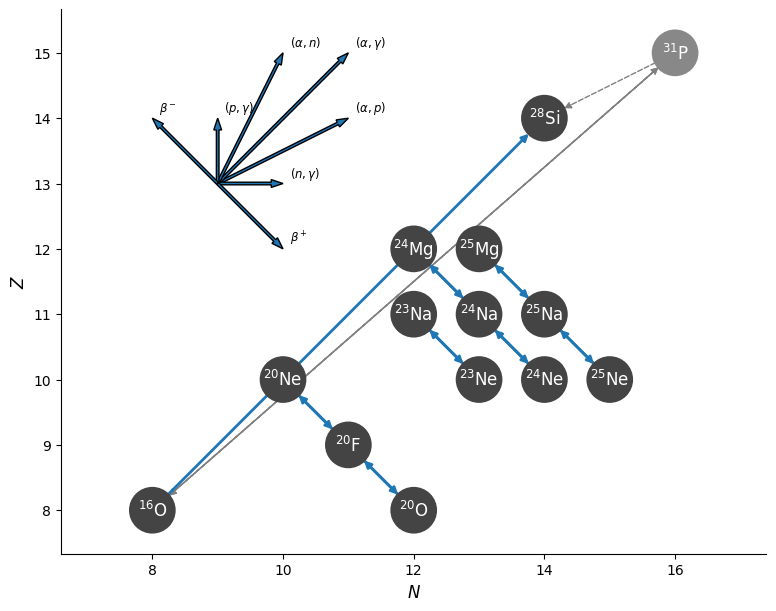
The largest of these networks appears as:
Step 4: Set reaction rate source
So far we have been using the Suzuki et al. rates, but with new experimental and theoretical data, some of these rates could change. In this crowdsourcing exercise, some of you will be implementing custom rates provided by us, or ask MESA to calculate weak reaction rates on the fly.
Check the Google spreadsheet here to remind yourself which rates you picked.
Note
Not everyone will get to implement custom rates / MESA on-the-fly weak rates, but there will be plenty of time at the end of this lab. Come back here for bonus points!
Suzuki Rates
Step 4: Using Suzuki Rates
| 📋 TASK 4 |
|---|
Edit your inlist_rates to ask MESA to use Suzuki weak rates. |
Hint: which inlist option?
You can easily search for this:
grep -r suzuki $MESA_DIR/star/defaultsPartial solutions
You need this one line in your star_job section of your inlist_rates:
use_suzuki_weak_rates = .true.Note
The Suzuki tables only cover .
Custom Weak Rates
You can supply your own tabulated weak rates to MESA. Here we will show you how to use this feature.
Note
You can also do this for regular reactions, but here we’ll show you how to use custom weak reaction rates.
Step 4a: Tell MESA to use a custom rate table
We first need to tell MESA the location of the directory to find the tabulated custom rates. This is an inlist option.
| 📋 TASK 4a |
|---|
Edit inlist_rates to have it use weak rates from a directory called tables_custom. We have supplied you with tables_custom in the starting point. Check to make sure it’s there. |
Hint: how to find this inlist option?
Look up rate_table in $MESA_DIR/star/defaults/:
grep -r rate_table $MESA_DIR/star/defaults/Partial Solution
Add the following to the star_job section of your inlist:
rate_tables_dir = 'tables_custom'You will also need to ask MESA to not use Suzuki weak rates, in the star_job section:
use_suzuki_weak_rates = .false.In tables_custom, each h5 file contains the rates for each weak reaction, for example, on-the-fly_r_f20_wk_o20.h5 for the electron capture reaction
.
Step 4b: Edit weak_rates.list
Once we point MESA to tables_custom, it will look for rate_list.txt (for regular reactions, which we won’t modify) and weak_rate_list.txt (for weak reactions), if they exist.
These two lists tell MESA the reaction names and the corresponding file names.
| 📋 TASK 4b |
|---|
Add the following four reactions to tables_custom/weak_rate_list.txt. Take a look at weak_rate_list.txt to see what is needed. Use the files with the header on-the-fly* in the title. |
Warning
We have already included the other weak reactions for you. Do not remove any of the other reactions.
Hint
The format is as follows:
<reaction name> <h5 file name>Hint: what is the reaction name format?
r_x_wk_y.
For beta decay reactions (
), the format is r_x_wk-minus_y.Partial solution
You need to add the following to weak_rate_list.txt:
r_ne20_wk_f20 'on-the-fly_r_ne20_wk_f20.h5'
r_f20_wk-minus_ne20 'on-the-fly_r_f20_wk-minus_ne20.h5'
r_f20_wk_o20 'on-the-fly_r_f20_wk_o20.h5'
r_o20_wk-minus_f20 'on-the-fly_r_o20_wk-minus_f20.h5'
Special (On-the-fly) Weak Rates
MESA has the capability to calculate the weak reactions on-the-fly, if you supply the list of transitions and energy levels.
Step 4a: Telling MESA to use special (on-the-fly) weak rates
This is an inlist option.
| 📋 TASK 4a |
|---|
Edit inlist_rates to have MESA use special weak rates. |
Hint: What inlist option to look for?
The on-the-fly capability is called special_weak_rates in MESA. You can search this as follows:
grep -r special_weak $MESA_DIR/star/defaults/Partial solution
In &star_job of your inlist_rates, set
use_special_weak_rates = .true.You will also need to ask MESA to not use Suzuki weak rates, in the star_job section:
use_suzuki_weak_rates = .false.Step 4b: Feeding MESA the states and transitions
For MESA to calculate the weak rates, it needs to know the nuclear states of the isotopes (energies and spins), and the halftimes of the transitions between these states. Your starting point should contain a states file called weak.states and a transitions file called weak.transitions. Check to make sure.
| 📋 TASK 4c |
|---|
Edit inlist_rates to supply MESA with the states file and the transitions file. |
Hint: What inlist option to look for?
You have probably found them if you followed the hints from task 5a. You can search this as follows:
grep -r special_weak $MESA_DIR/star/defaults/Partial solution
In &star_job, set
special_weak_states_file = 'weak.states'
special_weak_transitions_file = 'weak.transitions'
Step 5: Change Log Directory
| 📋 TASK 5 |
|---|
| Finally, change the output directory to something you name. |
A suggested format is something like LOGS_<accretion rate>_<net name>_<weak rate name>.
Hint: what inlist option to use?
This is called log_directory. You can easily search this:
grep -r log_directory $MESA_DIR/star/defaults/Partial solution
In &controls of your inlist_rates, set something like,
log_directory = "LOGS_1d-6_ONe_custom"Now you’re ready to go!
Step 6: Declaring Bankruptcy
| 📋 TASK 6 |
|---|
The only thing stopping your white dwarf from getting bankrupt is just you hitting ./rn. Record the central density and temperature of your model in the Google spreadsheet here at the end of the run. |
Tip
You can do the following sanity check to see if you’re using the correct net:
In star_job in inlist_net, set show_net_species_info = .true. and show_net_reactions_info = .true..
Then do ./rn and let MESA run for a few steps. MESA will first print out the species and reactions in the net.
Tip
If you’re using custom rates, when MESA first runs, you should see messages like reading user weak rate file tables_custom/on-the-fly_r_ne20_wk_f20.h5.
Warning
If you haven’t yet, do ./clean && ./mk first.
Note
An example solution is provided here, for
,ONeMg2Na.net, and Suzuki weak rates. inlist_rates contains the solutions for custom rates and special (on-the-fly) rates too in the comments.
Review reaction flow with pynucastro
We will first visualize the reaction flow with the pynucastro python package and build up some intuition.
| 📋 TASK 7 |
|---|
Go to this Google colab notebook. Click on File > Open > Google colaboratory on the top left corner. Once a new tab opens, click on File > Save a copy in Drive on the top left corner. Modify your own copy, do not modify the original copy. Follow the instructions there. |
Comparing the thermal history of the core
Compare the final central density and temperature of your model to others on the crowdsource spreadsheet. What do you notice?
Click on the tabs to reveal our suggested answers:
Q1: How does the core thermal history change with accretion rate?
Due to the accretion, the core is compressed to higher densities and temperatures. In quasiequilibrium, this compressional heating balances neutrino cooling, setting the temperature evolution of the core.
With a lower accretion rate , the core gets compressed less strongly, which in general leads to a lower core temperature.
Note
In fact, for a sufficiently low accretion rate (e.g., ), Urca cooling plunges the core temperature so low that the core crystallizes. This happens when the Coulomb coupling parameter , the ratio between Coulomb potential energy and thermal energy for ions, reaches . The Skye EOS does this much more properly than the HELM EOS used in this lab, but we turned it off for timing considerations. One of the bonus tasks invites you to look into this.
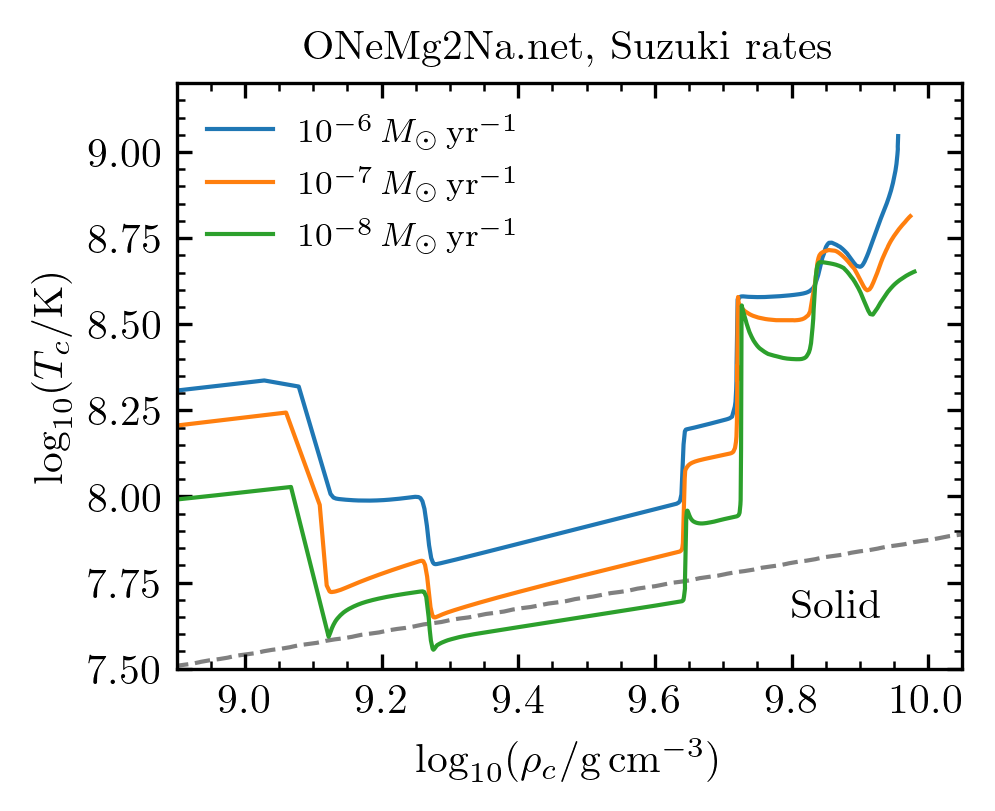 *Evolution of central temperature-density, for models accreting at
using ONeMg2Na.net and Suzuki weak rates. Dashed line shows the regime where the core is expected to crystallize.
*Evolution of central temperature-density, for models accreting at
using ONeMg2Na.net and Suzuki weak rates. Dashed line shows the regime where the core is expected to crystallize.
Q2: How do the different networks change the core evolution?
Click through the different tabs to see how the central temperature-density evolution changes as we add more and more reactions in the network. We take a model accreting at using Suzuki weak rates. Dashed line shows roughly where important weak reactions kick in.
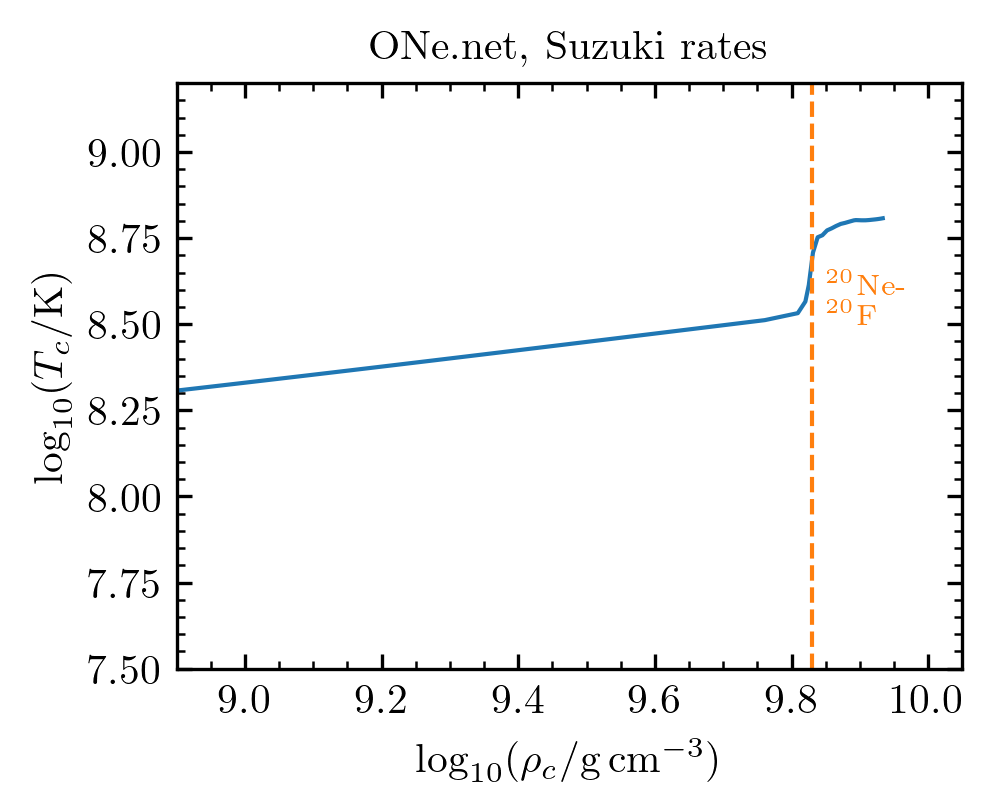
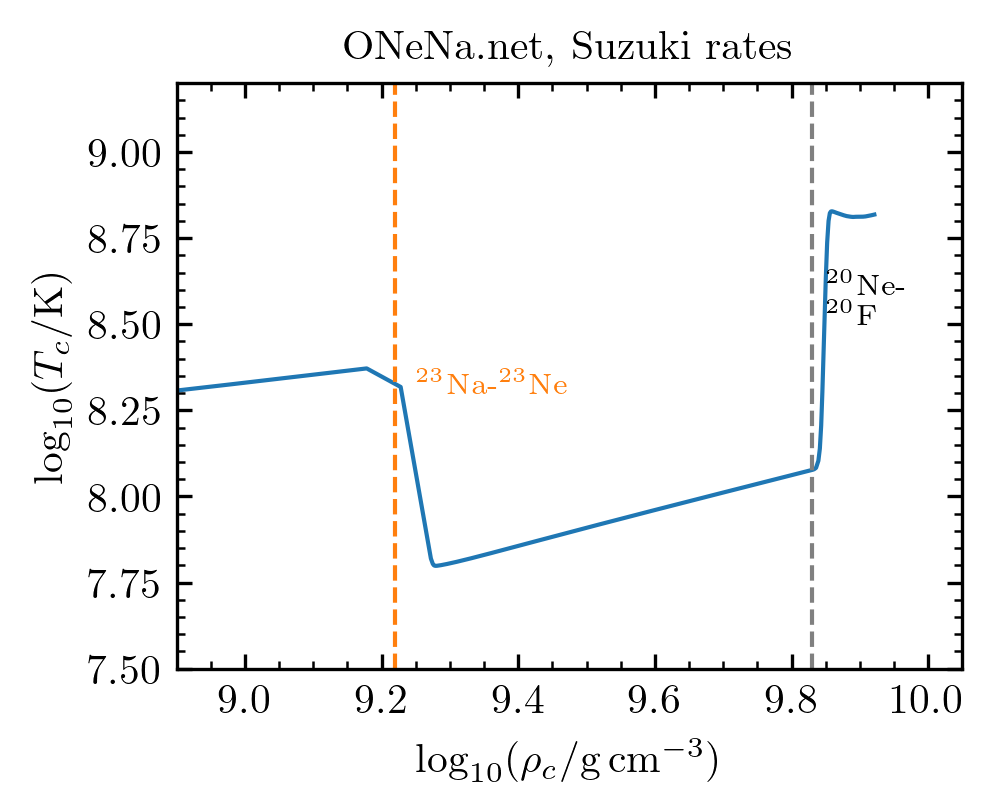
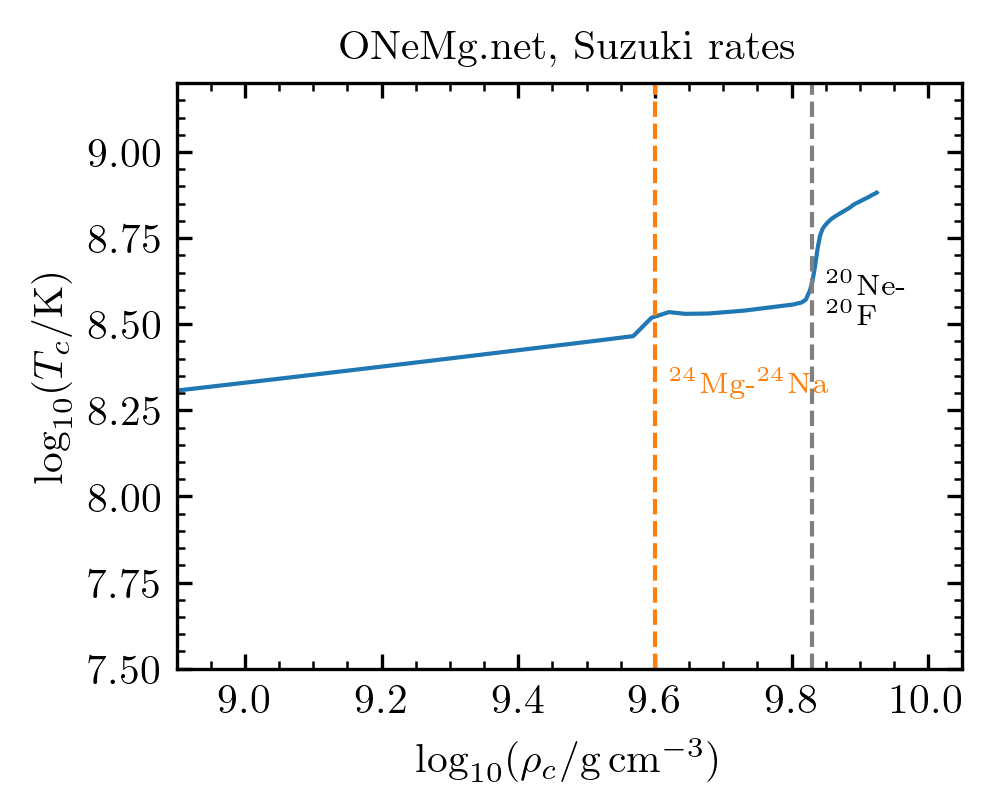
ONeMg.net plot, for this particular accretion rate.
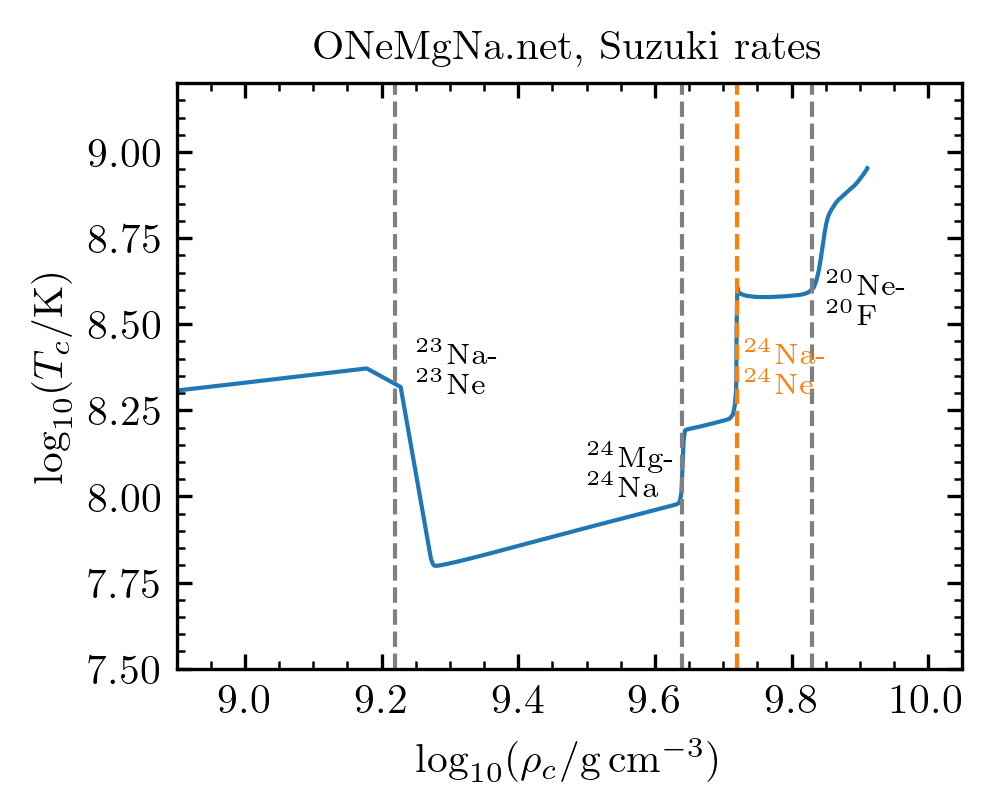
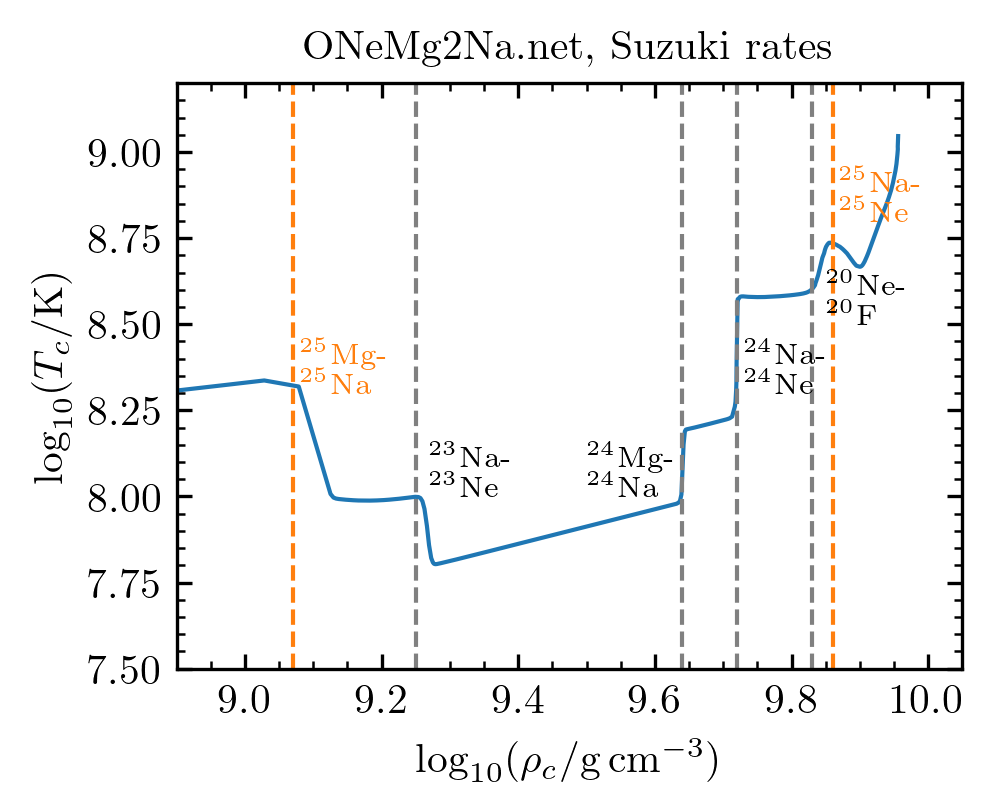
Q3: How do the different weak rates change the core evolution?
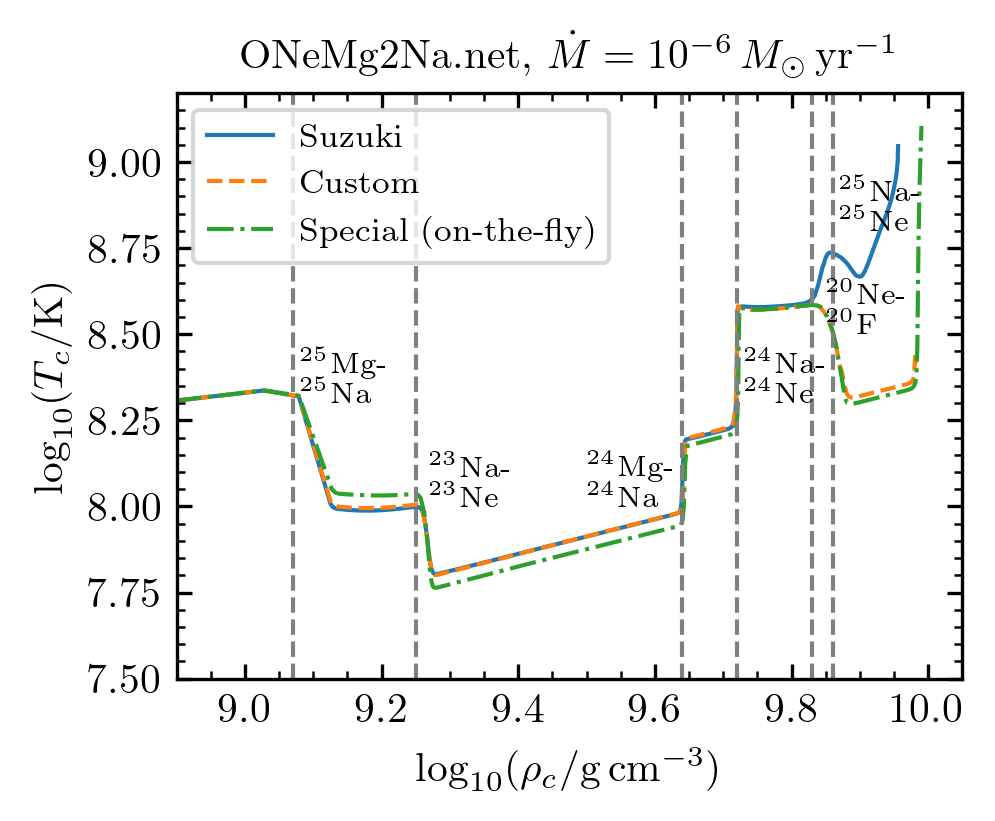
Most of the custom weak rates are actually taken from the outputs of the special (on-the-fly) weak rates, so these should give roughly the same evolution. The only exceptions are the and Urca reactions, where the custom weak rates are taken from the Suzuki weak rates.
The plot below shows the central temperature-density evolution of models accreting at
using the ONeMg2Na.net. You’ll notice that there are a few differences due to the following reactions:
- and Urca reactions: For these two reactions, the custom rates are taken from Suzuki rates, and both of these differ very slightly from the special weak rates. The main reason is that the Suzuki/custom tables are a little too sparse.
-
: the Suzuki weak rates differ significantly from the custom/special weak rates. The reason is that the latter do not account for an additional transition between the ground states of
and
, whose rate was not well determined until about 2019. The Suzuki weak rates from 2016 only accounted for this transition at its upper experimental limit. Neither is correct. Subsequent work by Kirsebom et al. 2019 determined the rate of this transition and its astrophysical impact, which you can read about here. Its effect is to slightly favor an explosion and not a collapse.
Q4: What is the final fate of these mdoels?
Let’s go back to this plot from Lab 1, taken from Holas+ 2026:
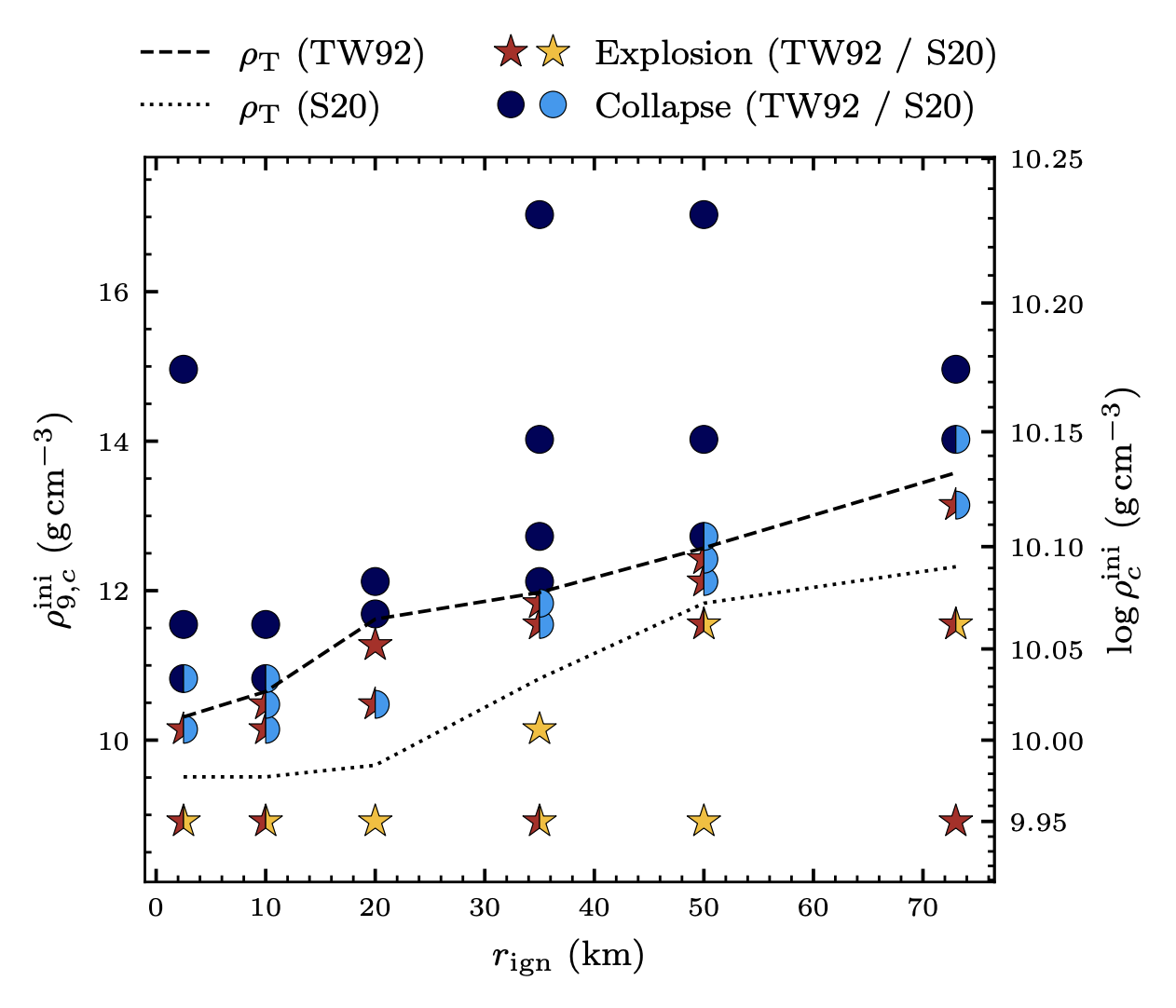 Figure 8, from Holas+26: Outcomes of 3D hydrodynamic simulations by ignition location and central density at ignition. The dashed and dotted lines indicate the transition from explosion to collapse for the TW92 and S20 flame speeds, respectively.
Assuming central ignition and the S20 model, we see that the critical density is about . Above this critical density, the star tends to collapse. Below this critical density, the star tends to explode.
Looking at the crowdsourcing spreadsheet, you’ll notice that the ones that are favored to explode (
), tend to be ones that don’t account for Urca cooling (e.g. ONe.net, or ONeMg.net), or have high accretion rates (e.g.
), or use the Suzuki weak rates which try to account for a particular transition in the exothermic
electron capture.
What’s very interesting, is that most of our models lie in the density range between , where it’s ambiguous whether the star collapses or explodes!
Any tiny change in our modeling assumptions, changes the outcome of the star dramatically!
Takeaways
Click here for spoilers
- The thermal history of an accreting oxygen-neon white dwarf depends on its accretion rate. A higher accretion rate leads to stronger compressional heating and in turn a higher core temperature.
- Urca reactions like the pair cool the core by emitting neutrinos, and very slightly increase the core density at oxygen ignition.
- This normally wouldn’t change the final outcome, but here our models lie right at the boundary between collapse and explosion, so you need to be careful about all your modeling assumptions. (We haven’t even touched convection yet! See bonus lab for more.)
- We played around with different weak reaction rates. In particular, the uncertain electron capture may change the final outcome. This was addressed in Kirsebom et al. 2019.
- All these ingredients are important in producing electron-capture supernova progenitors with realistic temperature and composition profiles, and determining the final outcome.
Bonus exercises
We have done many things in this lab to ensure short runtimes. Here are a few suggested exercises you can try towards building a better model.
| 📋 TASK |
|---|
Download the Lab 3 solutions here, for
,ONeMg2Na.net, and Suzuki weak rates. Clean and compile. |
Do not attempt these all at once! Your run will be unbearably slow.
Here we briefly describe what skills you’ll learn with each task:
- Bigger reaction network: using
pynucastroand modifying nuclear net. Take advantage of Mike being around! - Soft-wired net: modifying nuclear net.
- Time resolution: using run_star_extras. Takes longer than the others to implement.
- Spatial resolution: modifying inlist options.
- Skye EOS: modifying inlist options. The run may be long.
- Convection: modifying inlist options.
Bigger reaction network
Oxygen burning
In this lab, we asked you to use r1616 for oxygen burning. What exactly does it do?
| 📋 TASK |
|---|
Look up r1616 on $MESA_DIR/data/rates_data/reactions.list. |
Hint: How to search?
grep -r r1616 $MESA_DIR/data/rates_data/reactions.listPartial solution
You should see something like
r1616 2 o16 => 1 he4 + 1 si28which is exactly
.
But if you open $MESA_DIR/data/rates_data/reactions.list and go to line 124, under info, you’ll see
o16+o16 => a + si28, a and pThe
reaction doesn’t always give an alpha particle (
) and
as products. It sometimes returns a proton as a product (
). To keep our nuclear net small, we purposely left out
. The r1616 rate combines both the a and p channels, but uses
as the end point. This is also what built-in nets like co_burn.net do.
An obvious improvement would be to include in our net and add the reactions that connect it to .
Other important reactions
What other important reactions have we missed? Here we will use pynucastro to find out.
| 📋 TASK |
|---|
Go to this part of the lecture. Use pynucastro to find out what isotopes and reactions are missing. Edit your net accordingly. |
Note
We recommend that you just add the reactions from the filtered_rates list, for the sake of time. However, if you really want to, try implementing the missing isotopes and reactions from the possibly_important list.
Partial solutions
Here we will build on ONeMg2Na.net add the following reactions:
Copy ONeMg2Na.net to new.net, and add the following to new.net, within the add_reactions( ) section:
r_ne20_ap_na23
r_o20_ag_ne24
r_f20_ap_ne23
r_o16_ag_ne20
r_ne20_ag_mg24
r_f20_ag_na24
The general rules is that reactions that take in a
(
) particle and spit out a proton are named r_<input>_ap_<output>, and those that spit out a photon instead are named r_<input>_ag_<output>.
Next, edit inlist_net and set
new_net_name = 'nets_lab3/new.net'Now you’re ready to run.
Tip
Before running, add the following to your inlist_pgstar:
power_win_flag = .true.
power_xaxis_name = 'logRho'
power_xmin = 9.8d0
Power_legend_txt_scale_factor = 1.0
This will open up another pgstar window, that shows the nuclear energy generation rate from each reaction category as a function of density. You won’t see anything until the central density hits about .
| 📋 TASK |
|---|
Finally, ./rn. Observe the power window, and check if the final central density at ignition is different. |
What do you see?
Here’s the additional pgstar window you should see:
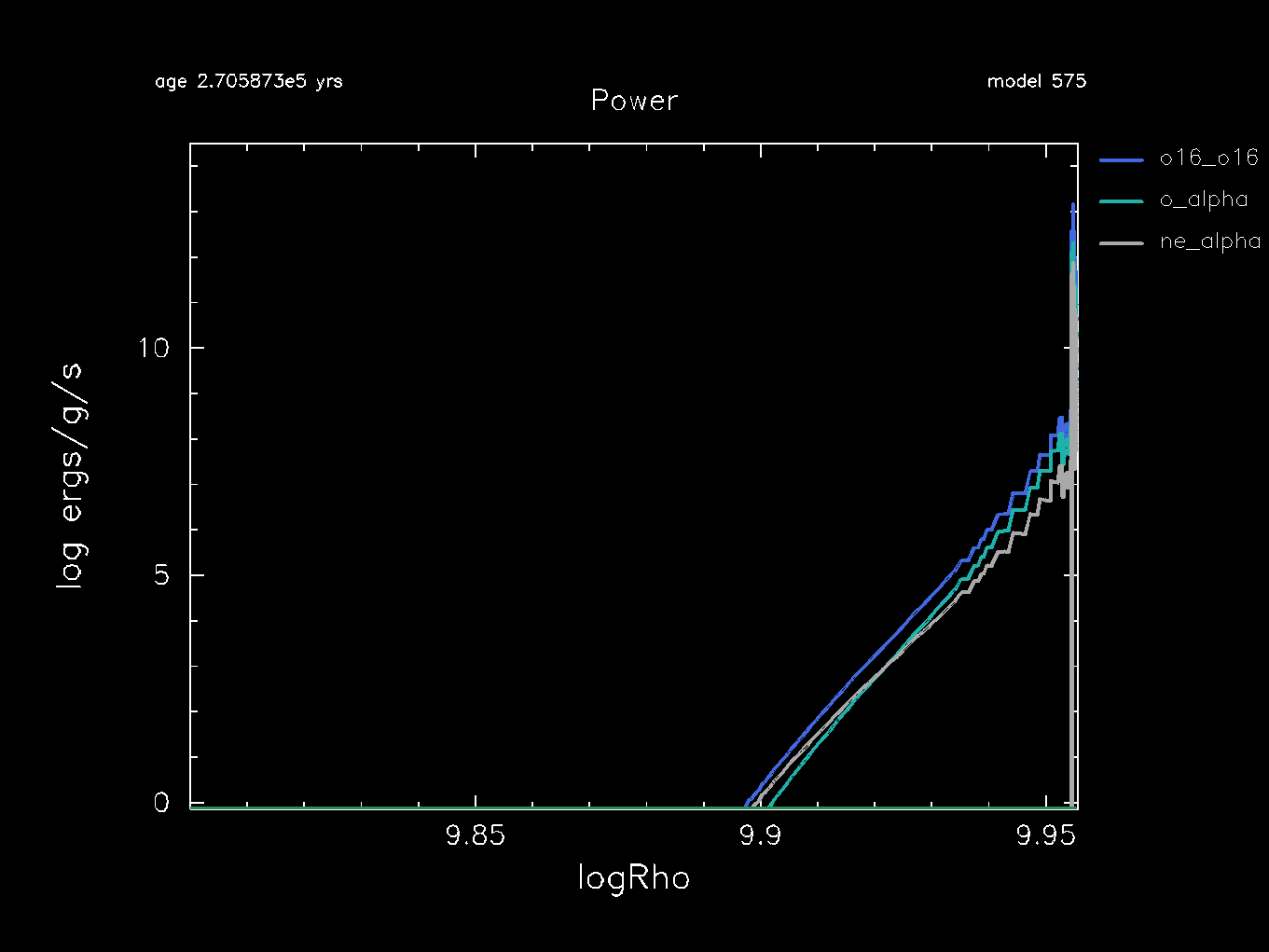
It shows that we successfully added the alpha-capture reactions, and that the alpha-captures onto oxygen and neon could be comparable to the reaction.
The following plot compares the central temperature-density evolution between our old ONeMg2Na.net and our newly created new.net:
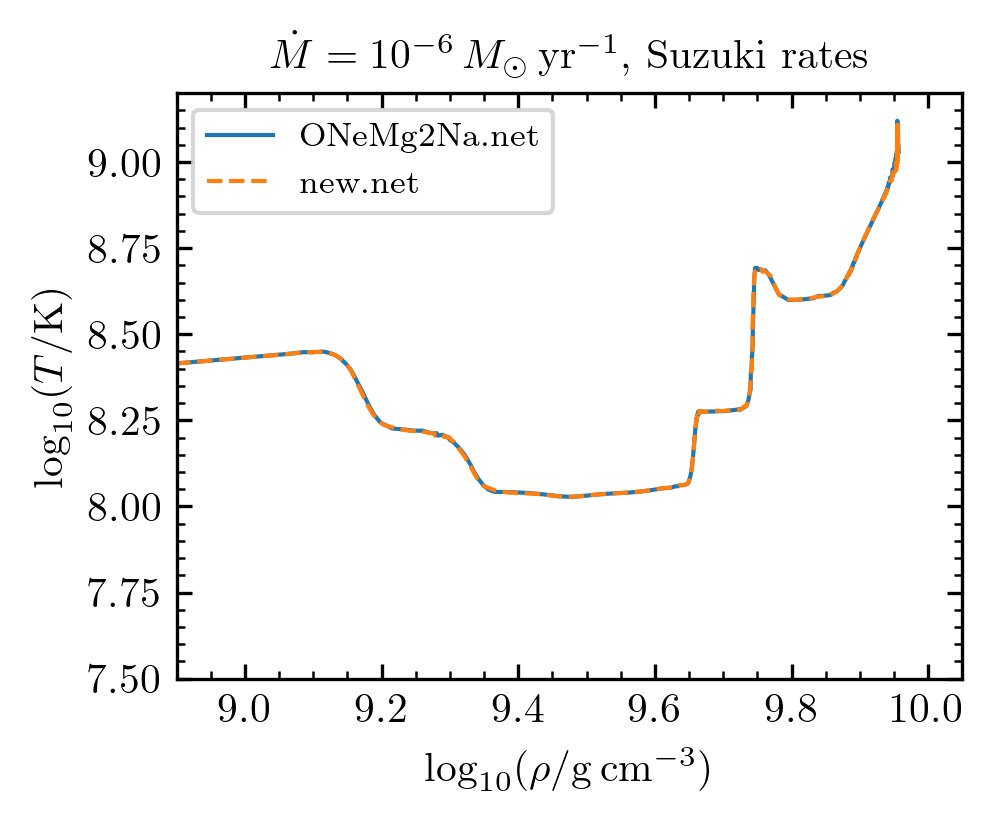
Interestingly, our newly added reactions don’t seem to affect the core evolution significantly, but you never know!
Soft-wired Net
In this lab, we showed you how to hard-wire a list of isotopes and reactions into the net. You can also supply a list of isotopes to MESA and ask it to connect them with every possible reaction. Here we will do that.
| 📋 TASK |
|---|
Look up how built-in nets like mesa_49.net soft-wire the network. |
Hint: where do the built-in nets live?
$MESA_DIR/data/net_data/nets.Partial solutions
The soft-wiring is done by
add_isos_and_reactions(
    <isotope name>
    <chemical name> <lower limit of mass number> <upper limit of mass number>
)
For example,
add_isos_and_reactions(
    h1
    he 3 4
)
will include , , .
| 📋 TASK |
|---|
Take the same isotopes as ONeMg2Na.net and soft-wire the network. |
Partial solutions
add_isos_and_reactions(
    h1
    he4
    o16
    o20
    f20
    ne20
    ne 23 25
    na 23 25
    mg 23 25
    si28
)| 📋 TASK |
|---|
| Edit your inlist to have MESA print out the list of isotopes and reactions. |
Hint: where to find this option?
Look up show_net on $MESA_DIR/star/defaults/:
grep -r show_net $MESA_DIR/star/defaults/Partial solutions
star_job in inlist_net, set show_net_species_info = .true. and show_net_reactions_info = .true..Now you’re ready to run.
| 📋 TASK |
|---|
Finally, ./rn. Look at the terminal to find the list of species and reactions in your new net. Observe if the reaction flow behaves differently. |
In this lab, we relaxed the time resolution when it comes to the white dwarf’s surface luminosity and temperature:
delta_lgL_limit = 0.2d0
delta_lgTeff_limit = 0.05d0
These two items mainly affect the time stepping that matters more for the accretion (because compressional heating changes the surface luminosity). But otherwise, we didn’t do anything to relax the time resolution.
Limiting changes in and
Now, when the core undergoes weak reactions and oxygen ignition, we’ve seen that it undergoes rapid changes in and .
We will work through some useful controls to limit these changes.
| 📋 TASK |
|---|
| Check out which inlist options are related to timestepping limited by changes in and . Add these controls into your inlist. |
Hint: which inlist section?
&controls section. Check out $MESA_DIR/star/defaults/controls.defaults.Partial solutions
These are actually commented out in inlist_commons.
The options like
delta_lgT_cntr_limit = 2d-2  ! default is 0.01d0
delta_lgRho_cntr_limit = 5d-3 ! default is 0.05d0| 📋 TASK |
|---|
Add these controls into your inlist and run MESA again. What values to use? A good starting point is in the partial solutions above. |
Limiting changes in nuclear burning luminosity
When oxygen burning starts, the temperature profile changes very rapidly. A good way to limit these changes would be to use
delta_lgT_max_limit = 0.01d0 ! default is -1, meaning this is turned off
delta_lgT_max_limit_lgT_min = 8.8d0
This combination will limit the change in by less than once , and has no effect for lower temperatures.
Alternatively, you can try to limit changes in the nuclear burning luminosity
. Normally, you can use delta_lgL_nuc_limit to limit changes in
. The problem is, here the weak reactions produce a lot of cooling and cancel out the overall nuclear burning luminosity globally (but not locally). So, here we will show you how to do this with run_star_extras, particularly with other_timestep_limit.
| 📋 TASK |
|---|
Add use_other_timestep_limit = .true. in inlist_common. |
Next, we will edit run_star_extras.
| 📋 TASK |
|---|
Copy the subroutine in $MESA_DIR/star/other/other_timestep_limit.f90 to your run_star_extras. Rename it L1616_timestep_limit. |
Partial solutions
Your subroutine should look like this
integer function L1616_timestep_limit( &
    id, skip_hard_limit, dt, dt_limit_ratio)
    use const_def, only: dp
    use star_def
    integer, intent(in) :: id
    logical, intent(in) :: skip_hard_limit
    real(dp), intent(in) :: dt
    real(dp), intent(inout) :: dt_limit_ratio
    L1616_timestep_limit = keep_going
end function L1616_timestep_limit
Warning
Because this is a Fortran function, make sure you also change other_timestep_limit = keep_going to L1616_timestep_limit = keep_going in the second last line of this subroutine!
Tip
To check if you did this right, do ./mk.
| 📋 TASK |
|---|
Next, make sure that your star pointer points to this subroutine in run_star_extras. |
Hint: where to point?
extra_controls.Partial solutions
In your extra_controls, add s% other_timestep_limit => L1616_timestep_limit. Your extra_controls should look like
    subroutine extras_controls(id, ierr)
         integer, intent(in) :: id
         integer, intent(out) :: ierr
         type (star_info), pointer :: s
         ierr = 0
         call star_ptr(id, s, ierr)
         if (ierr /= 0) return

         ! this is the place to set any procedure pointers you want to change
         ! e.g., other_wind, other_mixing, other_energy  (see star_data.inc)


         ! the extras functions in this file will not be called
         ! unless you set their function pointers as done below.
         ! otherwise we use a null_ version which does nothing (except warn).

         s% extras_startup => extras_startup
         s% extras_start_step => extras_start_step
         s% extras_check_model => extras_check_model
         s% extras_finish_step => extras_finish_step
         s% extras_after_evolve => extras_after_evolve
         s% how_many_extra_history_columns => how_many_extra_history_columns
         s% data_for_extra_history_columns => data_for_extra_history_columns
         s% how_many_extra_profile_columns => how_many_extra_profile_columns
         s% data_for_extra_profile_columns => data_for_extra_profile_columns

         s% how_many_extra_history_header_items => how_many_extra_history_header_items
         s% data_for_extra_history_header_items => data_for_extra_history_header_items
         s% how_many_extra_profile_header_items => how_many_extra_profile_header_items
         s% data_for_extra_profile_header_items => data_for_extra_profile_header_items

         !!! new
         s% other_timestep_limit => L1616_timestep_limit

      end subroutine extras_controls
Now, we are ready to edit L1616_timestep_limit. Our goal is to have MESA check the nuclear burning luminosity of the
reaction,
, and implement timestep limits based on how much
changes.
| 📋 TASK |
|---|
Find the star_data variable that is related to nuclear burning luminosity of specific reaction categories. |
Partial solutions
This is given by
! integrated eps_nuc_categories (ergs/sec)
real(dp), pointer :: luminosity_by_category(:,:) ! (num_categories, nz)
As you can see, the first index is for different categories of reactions, and the second index is for different zones in the stellar model.
| 📋 TASK |
|---|
Now that we have found the star_data variable for
, edit L1616_timestep_limit to have it calculate
at end of the current timestep, call it log_L1616. |
Hint: what is the index for in the burning categories?
This is given by ioo. However, ioo is defined elsewhere (in $MESA_DIR/chem/public/chem_def.f90), and run_star_extras does not know about this definition beforehand. You need to declare
use chem_defat the top of the function.
Hint: which zone do we want?
1.Hint: how will the L1616_timestep_limit function know about the star_data?
First, you need to call star_ptr, so that the L1616_timestep_limit function knows about the s pointer. This requires declaring
type (star_info), pointer :: s
integer :: ierr
at the top of the function, and then adding
ierr = 0
call star_ptr(id, s, ierr)
if (ierr /= 0) return
Partial solutions
Your function should look like
integer function L1616_timestep_limit( &
    id, skip_hard_limit, dt, dt_limit_ratio)
    use const_def, only: dp
    use star_def
    use chem_def, only : ioo ! new
    integer, intent(in) :: id
    logical, intent(in) :: skip_hard_limit
    real(dp), intent(in) :: dt
    real(dp), intent(inout) :: dt_limit_ratio
    real(dp) :: log_L1616 ! new
    type (star_info), pointer :: s  ! new
    integer :: ierr
    ierr = 0
    call star_ptr(id, s, ierr) ! new
    if (ierr /= 0) return

    L1616_timestep_limit = keep_going

    ! new
    log_L1616 = safe_log10(s% luminosity_by_category(ioo,1)/lsun)

end function L1616_timestep_limit| 📋 TASK |
|---|
Edit L1616_timestep_limit to check whether
is greater than a minimum value of
. If not, have it return; we do not want to limit the timestep if the oxygen burning luminosity is tiny. Implement this minimum using the inlist x_ctrl options. |
Partial solution
Your function should look like
integer function L1616_timestep_limit( &
    id, skip_hard_limit, dt, dt_limit_ratio)
    use const_def, only: dp
    use star_def
    use chem_def, only : ioo
    integer, intent(in) :: id
    logical, intent(in) :: skip_hard_limit
    real(dp), intent(in) :: dt
    real(dp), intent(inout) :: dt_limit_ratio
    real(dp) :: log_L1616
    type (star_info), pointer :: s
    integer :: ierr
    ierr = 0
    call star_ptr(id, s, ierr)
    if (ierr /= 0) return

    L1616_timestep_limit = keep_going

    log_L1616 = safe_log10(s% luminosity_by_category(ioo,1)/lsun)

    ! new
    if (log_L1616 <= s% x_ctrl(1)) return

end function L1616_timestep_limit
Warning
You should add x_ctrl(1) = -1d0 somewhere in the &controls section of your inlist.
Now we are ready to calculate the change in at the start and end of the timestep.
| 📋 TASK |
|---|
Edit L1616_timestep_limit to have it calculate
at start of the current timestep, call it log_L1616_start. Then have the function calculate the change in
at this timestep. |
Hint: is there a similar star_data variable for
at the start of timestep?
luminosity_by_category_start.Partial solution
Your function should look like
integer function L1616_timestep_limit( &
    id, skip_hard_limit, dt, dt_limit_ratio)
    use const_def, only: dp
    use star_def
    use chem_def, only : ioo
    integer, intent(in) :: id
    logical, intent(in) :: skip_hard_limit
    real(dp), intent(in) :: dt
    real(dp), intent(inout) :: dt_limit_ratio
    real(dp) :: log_L1616, log_L1616_start, dlog_L1616 ! new
    type (star_info), pointer :: s
    integer :: ierr
    ierr = 0
    call star_ptr(id, s, ierr)
    if (ierr /= 0) return

    L1616_timestep_limit = keep_going

    log_L1616 = safe_log10(s% luminosity_by_category(ioo,1)/lsun)
    if (log_L1616 <= s% x_ctrl(1)) return

    ! new
    log_L1616_start = safe_log10(s% luminosity_by_category_start(ioo,1)/lsun)
    dlog_L1616 = abs(log_L1616_start - log_L1616)

end function L1616_timestep_limit| 📋 TASK |
|---|
Now take a look at $MESA_DIR/star/private/timestep.f90 and try to understand how it limits the timestep based on changes in quantities. Go to line 1007 and look at the check_lgL integer function, particularly lines 1110 to 1131. Implement these in your L1616_timestep_limit function. We will limit the change in
to some value lim = 0.02d0, which you should implement with the inlist x_ctrl options. |
Partial solution
We will define a variable lim that stores the value of x_ctrl(2), which is the change in
allowed between timesteps.
Next, we will define a variable relative_excess = (dlog_L1616 - lim) / lim, which is relatively how much the change in
is, in excess of our target value lim.
Finally, we modify the value of dt_limit_ratio, which is passed into and out of the function. This tells MESA how much we want to limit the timestep dt. We calculate this following the functions in $MESA_DIR/star/private/timestep.f90.
Your function should look like
integer function L1616_timestep_limit( &
    id, skip_hard_limit, dt, dt_limit_ratio)
    use const_def, only: dp
    use star_def
    use chem_def, only : ioo
    integer, intent(in) :: id
    logical, intent(in) :: skip_hard_limit
    real(dp), intent(in) :: dt
    real(dp), intent(inout) :: dt_limit_ratio
    real(dp) :: log_L1616, log_L1616_start, dlog_L1616
    real(dp) :: lim, relative_excess ! new
    type (star_info), pointer :: s
    integer :: ierr
    ierr = 0
    call star_ptr(id, s, ierr)
    if (ierr /= 0) return

    L1616_timestep_limit = keep_going

    log_L1616 = safe_log10(s% luminosity_by_category(ioo,1)/lsun)
    if (log_L1616 <= s% x_ctrl(1)) return
    log_L1616_start = safe_log10(s% luminosity_by_category_start(ioo,1)/lsun)
    dlog_L1616 = abs(log_L1616_start - log_L1616)

    ! new
    lim = s% x_ctrl(2)
    relative_excess = (dlog_L1616 - lim) / lim
    dt_limit_ratio = 1d0/pow(s% timestep_dt_factor,relative_excess)
    if (dt_limit_ratio <= 1d0) dt_limit_ratio = 0

end function L1616_timestep_limit
Warning
You should add x_ctrl(2) = 0.05d0 somewhere in the &controls section of your inlist.
Now we are ready to run and test whether our L1616_timestep_limit function works.
| 📋 TASK |
|---|
Compile and run MESA. Check the terminal to see if the timestep is limited by other_timestep towards the end. |
Warning
Did you set use_other_timestep_limit = .true., x_ctrl(1) = -1d0, and x_ctrl(2) = 0.02d0 in the &controls section of your inlist?
Tip
You can ask MESA to print out the value of , to make sure that the changes in this quantity are small between timesteps towards the end.
Spatial Resolution
Resolution around Urca shells
One thing we did do well is putting more spatial resolution around the Urca shells:
| 📋 TASK |
|---|
Take a look at inlist_common. Check out which inlist options are related to resolution around the Urca shells. |
Partial solutions
Here we opted to put more resolution where the Urca species are changing abundances.
The options like
xa_function_species(1) = 'na25'
xa_function_weight(1) = 15
xa_function_param(1) = 1d-4
track the mass fraction of particular species and put more resolution where more change is happening. In this example, we put more resolution where changes mass fraction and reaches .
Tip
You would think that higher spatial resolution would slow your run down. While mostly true, this also helps with convergence. When encountering convergence problems, one generally useful technique is to ensure that you have enough spatial resolution.
| 📋 TASK |
|---|
Comment out the xa_function* options in inlist_common, and run MESA again. Observe if the number of retries are higher. Note also the shape of the
profile around the Urca shells. |
Hope this exercise helps you appreciate the utility of higher spatial resolution.
mesh_delta_coeff
Of course, we lowered the overall spatial resolution by setting a large mesh_delta_coeff = 2.5.
Tip
For converged runs, try mesh_delta_coeff less than or equal to 1.
| 📋 TASK |
|---|
Set mesh_delta_coeff = 1.0 in inlist_common, and run MESA again. Check if the evolution is any different. |
Warning
Uncomment the xa_function* options in inlist_common first. We want the resolution around Urca shells!
Skye EOS
In this lab, we have turned off the Skye EOS, in favor of the HELM EOS. They both cover the degenerate region, but Skye EOS has better treatment of Coulomb effects in these dense regions. Sadly, better physics (thermodynamics) sometimes means more convergence issues. So to speed things up, we turned off Skye EOS.
Important
For low accretion rates (like ), Urca cooling will cool the core sufficiently that it reaches crystallization. The thermodynamics of crystallization, and Coulomb effects under degenerate coniditions, are more properly treated with the Skye EOS, so it is important to consider using Skye EOS.
| 📋 TASK |
|---|
Set use_Skye = .true. in inlist_common, and run MESA again. Check if the evolution is any different. |
Important
We recommend
(mass_change = 1d-7 or greater). Lower values will result in hours-long runs because the Coulomb effects are stronger and there are more convergence issues.
Note
We also set mass_fraction_limit_for_Skye = 1d-10. By default, this is 1d-4. We lowered this number so that the EOS considers even trace elements on the thermodynamics. We do not recommend even lower values.
Throughout this lab, we have turned off convection by setting in the &controls section of inlist_common
mlt_option = 'none'This would matter, for example, when the exothermic electron capture chain happens and leads to a convective unstable region. Prior cooling from yields an even more conducive environment for the convective instability.
We have two reasons to turn off convection:
- We want to avoid convergence issues and ensure that the lab is quick to run.
- More importantly, as convection mixes isotopes out to the critical density at which a weak reaction happens, catastrophic cooling via the weak reactions can happen (which in turn leads to convergence issues). This calls for a reformulation of the standard mixing length theory, which may be addressed with 3D hydrodynamical simulations, way beyond the scope of this school. An example of the hydrodynamical simulations is convective Urca process in accreting carbon-oxygen white dwarfs (ask our lecturer Mike for more).
Turning off convection gives the limit in which energy is not transported out, and was done in Schwab+ 2017 as well.
Now we’ll attempt to turn on convection, in the limit of efficient energy transport.
| 📋 TASK |
|---|
In the &controls section of inlist_common, set the following options, and run MESA again. What is the final density of your model? |
mlt_option = 'Cox'
mix_factor = 0d0
use_Ledoux_criterion = .false.
Note
Here we turn off mixing to avoid convergence issues. We also ignore the stabilizing effect of the composition gradient by not using the Ledoux criterion for convection. When you’re done with the previous task, set use_Ledoux_criterion = .true. and run MESA again.
You may see some bisons later today. If you had to give one a name, what would it be? Go to the Google spreadsheet here and add your bison’s name. Our lecturer Mike will reward valuable MESA summer school points for his favorite name(s).
Caution
Do not pet the bison!!!